
Building a federated blog
In this tutorial, we will build a federated blog using Fedify and Astro. Blog posts are authored as Markdown files in Astro content collections and rendered on the server on request, while ActivityPub federation is handled by dynamic server routes. When you publish a new post (by deploying a new version of the site), your followers in the fediverse automatically receive it—no extra steps needed. Remote users can also reply to your posts from their own fediverse accounts, and those replies appear as comments on your blog.
This tutorial focuses more on how to use Fedify than on understanding the underlying ActivityPub protocol. You'll see how Fedify handles the complex parts of federation for you.
If you have any questions, suggestions, or feedback, please feel free to join our Matrix chat space or GitHub Discussions.
Target audience
This tutorial is aimed at those who want to learn Fedify and build their own federated blog software.
We assume that you have some experience creating web pages using HTML and basic JavaScript, and that you're comfortable using the command line. However, you don't need to know TypeScript, ActivityPub, or Fedify—we'll teach you what you need to know as we go along.
You don't need experience building ActivityPub software, but we do assume that you've used at least one fediverse application such as Mastodon or Misskey. This way you'll have a feel for what we're trying to build.
Goals
In this tutorial, we'll use Fedify and Astro to create a single-author federated blog that communicates with other fediverse software via ActivityPub. The blog will include the following features:
- Blog posts are authored as Markdown files in src/content/posts/.
- The blog can be followed by other actors in the fediverse.
- A follower can unfollow the blog.
- When the blog is deployed with new posts, those posts are delivered to all followers as ActivityPub activities.
- Remote users can reply to blog posts from their fediverse account.
- Replies appear as comments on the blog post page.
To keep things focused, we'll impose the following limitations:
- The author's profile (bio, avatar, etc.) can only be changed by editing source files.
- Post changes only propagate to followers on the next server restart; there is no mechanism to push immediate edits or deletions.
- There are no likes or reposts.
- There is no search feature.
- There are no authentication or authorization features.
The complete source code is available in the GitHub repository, with commits corresponding to each step of this tutorial for your reference.
Setting up the development environment
Installing Bun
Fedify supports three JavaScript runtimes: Deno, Node.js, and Bun. In this tutorial we'll use Bun because it includes a built-in SQLite driver (bun:sqlite) that we'll use later to store followers and comments.
TIP
A JavaScript runtime is a platform that executes JavaScript code outside of a web browser—on a server or in a terminal. Node.js was the original server-side JavaScript runtime; Bun is a newer, faster alternative that also comes with a built-in package manager and test runner.
To install Bun, follow the instructions on the Bun installation page. Once installed, verify it works:
bun --versionYou should see a version number such as 1.2.0 or later.
Installing the fedify command
To initialize a Fedify project you need the fedify command. Install it globally with:
bun install -g @fedify/cliVerify the installation:
fedify --versionMake sure the version is 2.2.0 or higher.
fedify init to initialize the project
Let's create a new directory for our blog and initialize the project. In this tutorial we'll call it astro-blog:
fedify init astro-blogWhen fedify init runs, it asks a series of questions. Select Bun, Astro, In-memory, and In-process in order:
             ___      _____        _ _  __
            /'_')    |  ___|__  __| (_)/ _|_   _
     .-^^^-/  /      | |_ / _ \/ _` | | |_| | | |
   __/       /       |  _|  __/ (_| | |  _| |_| |
  <__.|_|-|_|        |_|  \___|\__,_|_|_|  \__, |
                                           |___/

? Choose the JavaScript runtime to use
  Deno
❯ Bun
  Node.js

? Choose the package manager to use
❯ bun

? Choose the web framework to integrate Fedify with
  Bare-bones
  Hono
  Nitro
  Next
  Elysia
❯ Astro
  Express

? Choose the key–value store to use for caching
❯ In-memory
  Redis
  PostgreSQL

? Choose the message queue to use for background jobs
❯ In-process
  Redis
  PostgreSQL
  AMQP (e.g., RabbitMQ)
NOTE
Fedify is not a full-stack web framework—it's a library specialized for implementing ActivityPub servers. You always use it alongside another web framework. In this tutorial we use Astro with server-side rendering, which lets us work with Markdown content collections and handle ActivityPub endpoints all in the same application.
After a moment, you'll have a working project with the following structure:
- src/
- assets/ — Images and other static assets used in pages
- components/ — Reusable Astro components
- layouts/ — Page layout templates
- pages/ — Routes (each .astro file becomes a URL)
- index.astro — The home page (
/)
- index.astro — The home page (
- federation.ts — ActivityPub server definition (the Fedify part)
- logging.ts — Logging configuration
- middleware.ts — Connects Fedify to Astro's request pipeline
- public/ — Files served as-is (favicon, etc.)
- astro.config.ts — Astro configuration
- biome.json — Code formatter and linter settings
- package.json — Package metadata and scripts
- tsconfig.json — TypeScript settings
Because we're using TypeScript instead of plain JavaScript, source files have .ts or .astro extensions. We'll cover the TypeScript-specific syntax you need as we go along.
Let's verify the project works. First, install the dependencies:
cd astro-blog
bun install
Then start the development server:
bun run devYou should see output like this:
 astro  v6.x.x ready in xxx ms
┃ Local    http://localhost:4321/
┃ Network  use --host to expose
Leave the server running and open a second terminal. Run this command to look up the demo actor that fedify init created:
fedify lookup http://localhost:4321/users/johnIf you see output like this, everything is working:
✔ Looking up the object...
Person {
  id: URL "http://localhost:4321/users/john",
  name: "john",
  preferredUsername: "john"
}
This tells us there's an ActivityPub actor at /users/john on our server. An actor represents an account that can interact with other servers in the fediverse.
TIP
fedify lookup fetches and displays any ActivityPub object. It's like doing a fediverse search from the command line.
You can also use curl directly if you prefer:
curl -H "Accept: application/activity+json" \
  http://localhost:4321/users/john | jq .
The -H "Accept: application/activity+json" header tells Astro to return the ActivityPub JSON representation of the page rather than the HTML version. This is called content negotiation, and we'll cover it in detail when we implement our actor.
Stop the dev server with Ctrl+C for now.
Visual Studio Code
We recommend using Visual Studio Code while following this tutorial. TypeScript tooling works best in VS Code, and the generated project already includes settings for it.
After installing VS Code, open the project folder: File → Open Folder….
If a popup asks you to install the recommended Biome extension, click Install. Biome will automatically format your code on save, so you don't need to worry about indentation or code style.
Prerequisites
TypeScript
Before we start writing code, let's briefly go over TypeScript. If you're already familiar with TypeScript, feel free to skip this section.
TypeScript is a superset of JavaScript that adds optional static type annotations. The syntax is almost identical to JavaScript; you just add type information after a colon (:).
For example, this declares a variable name that must hold a string:
let name: string = "Alice";If you try to assign a value of the wrong type, your editor will show a red underline before you even run the code:
name = 42; // ← red underline: Type 'number' is not assignable to type 'string'You can also annotate function parameters and return types:
function greet(name: string): string {
  return `Hello, ${name}!`;
}
Throughout this tutorial we'll encounter a few more TypeScript features and explain them as they appear. TypeScript knowledge isn't required—just pay attention to the red underlines in your editor and read the error messages. They're usually very helpful.
Building the blog
Now that the project is scaffolded, let's turn it into an actual blog. We'll use Astro's content collections to manage blog posts as Markdown files, create a listing page, and add individual post pages. At the end of this chapter you'll have a working blog—no ActivityPub yet, just a clean static site.
Defining the content collection
Astro uses content collections to type-check and manage structured content like blog posts. Create the file src/content.config.ts:
import { defineCollection, z } from "astro:content";
import { glob } from "astro/loaders";

const posts = defineCollection({
  loader: glob({ pattern: "**/*.md", base: "./src/content/posts" }),
  schema: z.object({
    title: z.string(),
    pubDate: z.coerce.date(),
    description: z.string(),
    draft: z.boolean().optional(),
  }),
});

export const collections = { posts };
Let's walk through this:
defineCollection()declares a named collection of content files.glob(...)tells Astro to find all *.md files in src/content/posts/.z.object(...)is a Zod schema that validates and types the frontmatter in each Markdown file.
NOTE
Frontmatter is the YAML block at the top of a Markdown file, enclosed in ---. It holds metadata like the title and publication date.
The z object is a schema validation library called Zod. Each field in the schema corresponds to a frontmatter field in our Markdown posts. TypeScript will enforce that all posts have a title, pubDate, and description.
Writing blog posts
Create three sample posts. First, src/content/posts/hello-fediverse.md:
---
title: "Hello, Fediverse!"
pubDate: 2025-01-15
description: >-
  Welcome to this example federated blog built with Astro and Fedify.
  You can follow it from Mastodon or any other fediverse platform.
---

Welcome to this federated blog example! ...
Create two more posts—their exact content isn't important for the tutorial; what matters is that each post has valid frontmatter matching the schema.
TIP
The >- syntax in YAML is a block scalar—it lets you write a long string across multiple lines. Trailing newlines are stripped. This is handy for description fields that would otherwise make the frontmatter too wide.
The layout component
Replace src/layouts/Layout.astro with a minimal layout. The key parts are the Props interface (which TypeScript uses to type-check component usage) and a <slot /> where page content is injected:
---
interface Props {
  title?: string;
  description?: string;
}

const { title, description } = Astro.props;
const siteTitle = "Fedify Blog Example";
const pageTitle = title ? `${title} — ${siteTitle}` : siteTitle;
---

<!doctype html>
<html lang="en">
  <head>
    <meta charset="UTF-8" />
    <meta name="viewport" content="width=device-width, initial-scale=1.0" />
    <link rel="icon" href="/favicon.ico" />
    <title>{pageTitle}</title>
    {description && <meta name="description" content={description} />}
  </head>
  <body>
    <header>
      <nav>
        <a href="/" class="site-title">{siteTitle}</a>
      </nav>
    </header>
    <main>
      <slot />
    </main>
    <footer>
      <p>
        Built with <a href="https://astro.build/">Astro</a> and
        <a href="https://fedify.dev/">Fedify</a>.
      </p>
    </footer>
  </body>
</html>

<style is:global>
  *,
  *::before,
  *::after {
    box-sizing: border-box;
    margin: 0;
    padding: 0;
  }

  html {
    font-family: system-ui, sans-serif;
    font-size: 18px;
    line-height: 1.6;
    color: #1a1a1a;
    background: #fff;
  }

  body {
    max-width: 48rem;
    margin: 0 auto;
    padding: 1rem 1.25rem;
  }

  a { color: #0066cc; text-decoration: none; }
  a:hover { text-decoration: underline; }

  header {
    padding: 1rem 0;
    margin-bottom: 2rem;
    border-bottom: 1px solid #e5e5e5;
  }

  .site-title { font-size: 1.25rem; font-weight: 600; color: #1a1a1a; }

  main { min-height: 60vh; }

  footer {
    margin-top: 3rem;
    padding-top: 1rem;
    border-top: 1px solid #e5e5e5;
    font-size: 0.875rem;
    color: #666;
  }

  h1 { font-size: 2rem; line-height: 1.2; margin-bottom: 0.5rem; }
  h2 { font-size: 1.5rem; margin-top: 2rem; margin-bottom: 0.5rem; }
  p { margin-bottom: 1rem; }
  ul, ol { margin-bottom: 1rem; padding-left: 1.5rem; }
</style>
Notice that the layout uses <style is:global> rather than <style>. This tells Astro to apply these styles globally instead of scoping them to just this component.
TIP
The {description && <meta .../>} expression is JSX-style conditional rendering. It renders the <meta> tag only when description is truthy.
The blog listing page
Replace src/pages/index.astro with the blog listing:
---
import { getCollection } from "astro:content";
import Layout from "../layouts/Layout.astro";

const allPosts = await getCollection("posts");
const posts = allPosts
  .filter((post) => !post.data.draft)
  .sort((a, b) => b.data.pubDate.getTime() - a.data.pubDate.getTime());
---

<Layout>
  <h1>Blog</h1>
  <p class="tagline">A federated blog powered by Astro and Fedify.</p>
  <ul class="post-list">
    {
      posts.map((post) => (
        <li class="post-item">
          <time datetime={post.data.pubDate.toISOString()}>
            {post.data.pubDate.toLocaleDateString("en-US", {
              year: "numeric",
              month: "long",
              day: "numeric",
            })}
          </time>
          <h2>
            <a href={`/posts/${post.id}`}>{post.data.title}</a>
          </h2>
          <p>{post.data.description}</p>
        </li>
      ))
    }
  </ul>
</Layout>
getCollection("posts") fetches all entries in the posts collection. The post.data object is typed according to the Zod schema we defined. For example, post.data.pubDate is a Date object, not a raw string, because z.coerce.date() converts it automatically.
The individual post page
Create src/pages/posts/ and add a file named [slug].astro (note: the brackets are part of the filename—they tell Astro this is a dynamic route):
---
import { getCollection, render } from "astro:content";
import Layout from "../../layouts/Layout.astro";
const { slug } = Astro.params;
const posts = await getCollection("posts");
const post = posts.find((p) => p.id === slug);
if (!post || post.data.draft) {
return new Response(null, { status: 404, statusText: "Not Found" });
}
const { Content } = await render(post);
---
<Layout title={post.data.title} description={post.data.description}>
<article>
<header class="post-header">
<h1>{post.data.title}</h1>
<time datetime={post.data.pubDate.toISOString()}>
{post.data.pubDate.toLocaleDateString("en-US", {
year: "numeric",
month: "long",
day: "numeric",
})}
</time>
</header>
<div class="post-content">
<Content />
</div>
<footer class="post-footer">
<a href="/">← Back to all posts</a>
</footer>
</article>
</Layout>The brackets in the filename tell Astro this is a dynamic route—the name inside the brackets becomes a URL parameter accessible via Astro.params. When a request comes in for /posts/hello-fediverse, Astro sets Astro.params.slug to "hello-fediverse" and runs this page.
render(post) converts the Markdown content to HTML and returns a Content component. When you write <Content /> in the template, Astro renders the full post body.
Testing the blog
Start the development server:
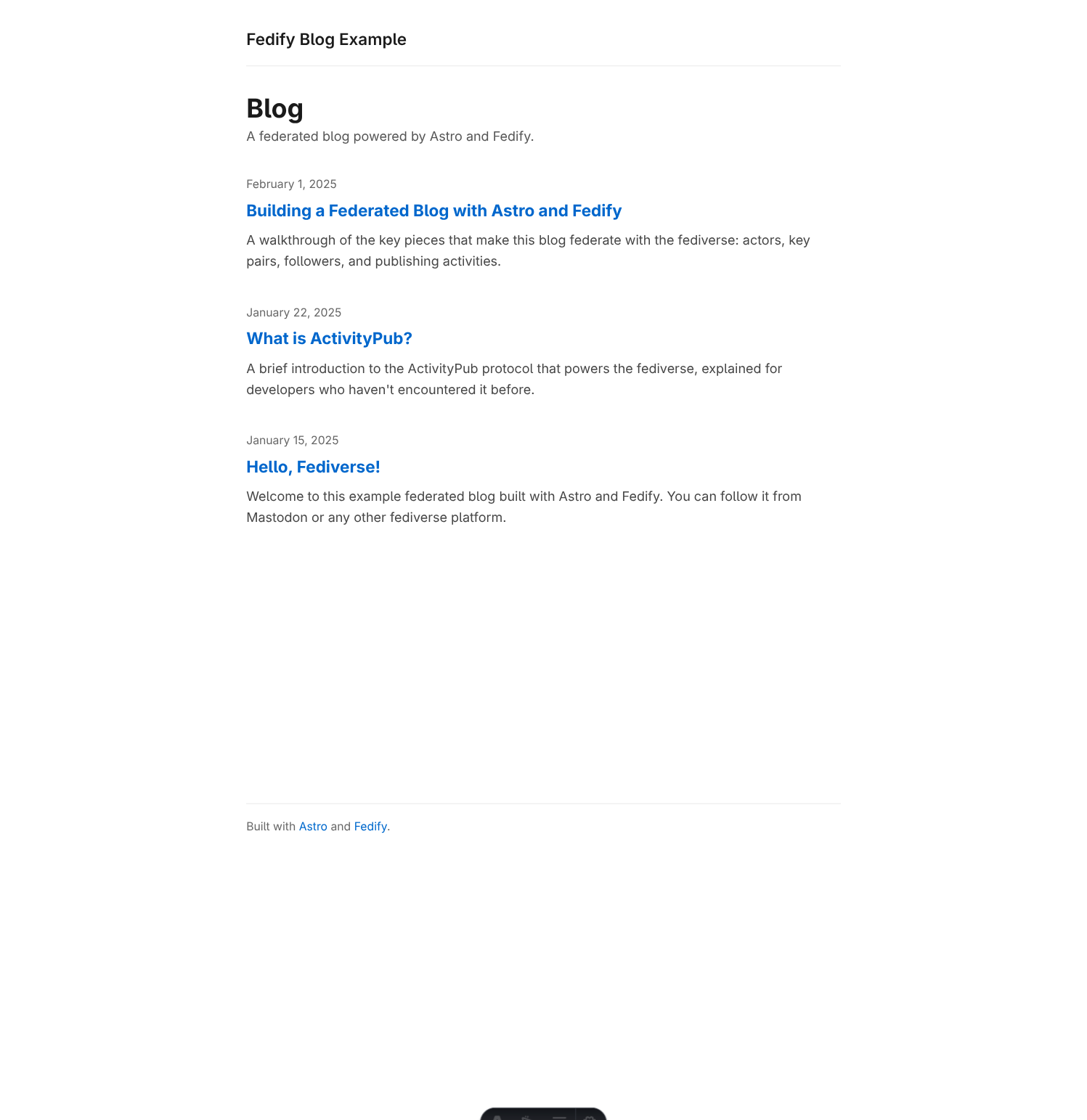
bun run devOpen http://localhost:4321/ in your browser. You should see a listing of all three posts, sorted newest-first:
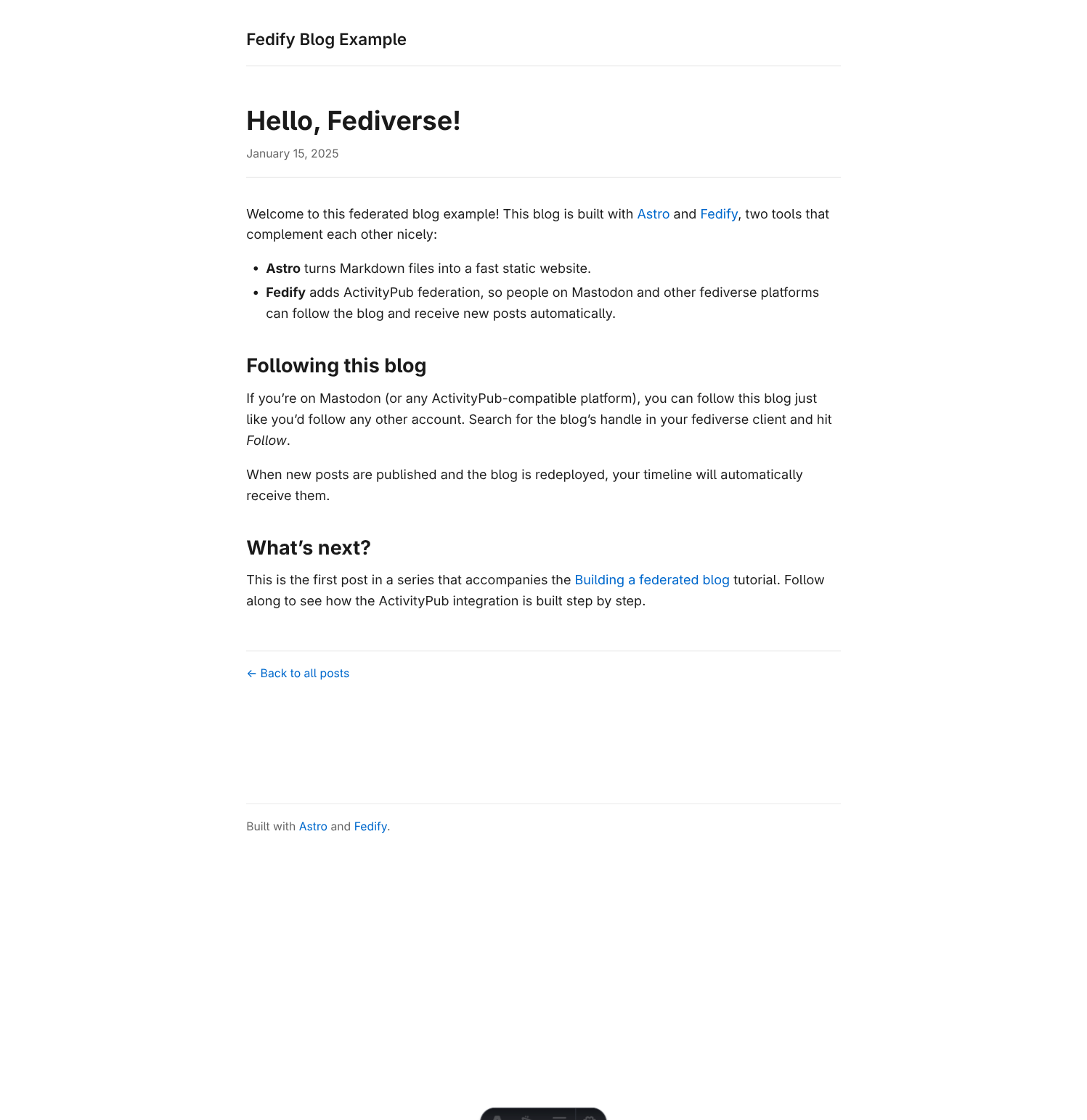
Click any post title to see the individual post page:
Stop the server with Ctrl+C when you're done.
Implementing the ActivityPub actor
We now have a working blog, but it's not federated yet. To make the blog discoverable by other ActivityPub servers (like Mastodon), we need to expose an actor—a machine-readable description of who or what is publishing content.
In ActivityPub, an actor is a JSON-LD document that describes an entity (a person, bot, group, or service) and tells other servers how to interact with it. For our blog, the actor will describe the blog itself: its name, where to send activities, and which cryptographic keys to use when signing outgoing requests.
In-memory store
Before we can implement the actor, we need somewhere to store key pairs. Cryptographic key pairs must be stable—if the keys change between requests, other servers will reject our signatures. We'll start with an in-memory solution and migrate to SQLite in a later chapter.
Create the file src/lib/store.ts:
// In-memory store for key pairs and followers.
// Uses globalThis to persist across Astro module reloads in dev mode.
// This data is lost when the server restarts — we'll fix that in a later
// chapter when we introduce SQLite.

declare global {
  var _keyPairs: Map<string, CryptoKeyPair[]>;
  var _followers: Map<string, string>;
}

if (globalThis._keyPairs == null) globalThis._keyPairs = new Map();
if (globalThis._followers == null) globalThis._followers = new Map();

export const keyPairs: Map<string, CryptoKeyPair[]> = globalThis._keyPairs;
export const followers: Map<string, string> = globalThis._followers;
The _followers map is also declared here even though we won't use it until Implementing followers—it's easier to keep both maps in the same place.
NOTE
We use globalThis instead of module-level variables because Astro's development server uses Vite's Hot Module Replacement (HMR), which re-evaluates modules whenever you save a file. If we stored key pairs in a plain module variable, they'd be reset to undefined on every save, causing authentication failures. Storing them on globalThis keeps them alive across HMR reloads.
Updating the federation module
Now let's update src/federation.ts to implement the actor. Replace the entire file with:
import {
  createFederation,
  generateCryptoKeyPair,
  InProcessMessageQueue,
  MemoryKvStore,
} from "@fedify/fedify";
import { Endpoints, Person } from "@fedify/vocab";
import { getLogger } from "@logtape/logtape";
import { keyPairs } from "./lib/store.ts";

const logger = getLogger("astro-blog");

export const BLOG_IDENTIFIER = "blog";
export const BLOG_NAME = "Fedify Blog Example";
export const BLOG_SUMMARY =
  "A sample federated blog powered by Fedify and Astro.";

const federation = createFederation({
  kv: new MemoryKvStore(),
  queue: new InProcessMessageQueue(),
});

federation
  .setActorDispatcher("/users/{identifier}", async (ctx, identifier) => {
    if (identifier !== BLOG_IDENTIFIER) {
      logger.debug("Unknown actor identifier: {identifier}", { identifier });
      return null;
    }
    const kp = await ctx.getActorKeyPairs(identifier);
    return new Person({
      id: ctx.getActorUri(identifier),
      preferredUsername: identifier,
      name: BLOG_NAME,
      summary: BLOG_SUMMARY,
      url: new URL("/", ctx.url),
      inbox: ctx.getInboxUri(identifier),
      endpoints: new Endpoints({
        sharedInbox: ctx.getInboxUri(),
      }),
      followers: ctx.getFollowersUri(identifier),
      publicKey: kp[0].cryptographicKey,
      assertionMethods: kp.map((k) => k.multikey),
    });
  })
  .setKeyPairsDispatcher(async (_ctx, identifier) => {
    if (identifier !== BLOG_IDENTIFIER) return [];
    const stored = keyPairs.get(identifier);
    if (stored) return stored;
    const [rsaKey, ed25519Key] = await Promise.all([
      generateCryptoKeyPair("RSASSA-PKCS1-v1_5"),
      generateCryptoKeyPair("Ed25519"),
    ]);
    const kp = [rsaKey, ed25519Key];
    keyPairs.set(identifier, kp);
    return kp;
  });

federation.setInboxListeners("/users/{identifier}/inbox", "/inbox");

federation.setFollowersDispatcher(
  "/users/{identifier}/followers",
  (_ctx, identifier) => {
    if (identifier !== BLOG_IDENTIFIER) return null;
    return { items: [] };
  },
);

export default federation;
Let's walk through the key changes:
BLOG_IDENTIFIER, BLOG_NAME, BLOG_SUMMARY are exported constants that we'll reuse in the HTML profile page.
setActorDispatcher registers a callback for the route /users/{identifier}. When an ActivityPub client fetches that URL, Fedify calls this callback and serializes the returned object to JSON-LD. We return null for any identifier that isn't our blog, which causes Fedify to respond with 404 Not Found.
The Person object we return carries:
id— the canonical URL of the actor, obtained viactx.getActorUri(identifier).preferredUsername— the short handle that ActivityPub software displays (e.g.,@blog@example.com).name,summary— display name and description.url— the human-readable profile URL (the blog home page).inbox— where other servers deliver activities (follows, replies, etc.). We register the inbox path below.endpoints.sharedInbox— a single inbox URL shared across all actors on this server. Most servers prefer to send bulk deliveries here.followers— the URL of the followers collection.publicKey,assertionMethods— cryptographic keys used to verify that activities truly came from this actor.
setKeyPairsDispatcher generates and caches two key pairs: one RSA-PKCS1-v1.5 key (for compatibility with older ActivityPub software) and one Ed25519 key (faster, modern). Both are stored in the keyPairs map.
setInboxListeners registers the inbox and shared inbox routes. We need to call this even before we add any handlers because Fedify needs to know the inbox path to include it in the actor's JSON-LD. We'll add actual handlers in Implementing followers.
setFollowersDispatcher registers the followers collection route. For now it returns an empty list; we'll fill it in Implementing followers.
Updating the middleware
Add an import for the logging module in src/middleware.ts so that LogTape is configured before any Fedify code runs:
import { fedifyMiddleware } from "@fedify/astro";
import federation from "./federation.ts";
import "./logging.ts";

export const onRequest = fedifyMiddleware(federation, (_context) => undefined);
The import "./logging.ts" side-effect import ensures that the LogTape configuration we defined in Setting up the development environment is loaded before the first request arrives. Without it, log messages from the federation layer would be silently discarded.
The actor profile page
Right now if a browser visits /users/blog, Astro would respond with a 404 because there is no page at that path. We need to add an HTML page so that both browsers and ActivityPub clients get useful responses at the same URL.
Create the directory src/pages/users/blog/ and add index.astro:
---
import { getCollection } from "astro:content";
import {
  BLOG_IDENTIFIER,
  BLOG_NAME,
  BLOG_SUMMARY,
} from "../../../federation.ts";
import Layout from "../../../layouts/Layout.astro";

const posts = await getCollection("posts");
const publishedPosts = posts
  .filter((post) => !post.data.draft)
  .sort((a, b) => b.data.pubDate.getTime() - a.data.pubDate.getTime());

const handle = `@${BLOG_IDENTIFIER}@${Astro.url.host}`;
---

<Layout
  title={`${BLOG_NAME} (@${BLOG_IDENTIFIER})`}
  description={BLOG_SUMMARY}
>
  <section class="profile">
    <h1>{BLOG_NAME}</h1>
    <p class="handle">{handle}</p>
    <p class="summary">{BLOG_SUMMARY}</p>
    <p class="hint">
      Follow this blog from your fediverse account to receive new posts
      automatically.
    </p>
  </section>

  <section class="posts">
    <h2>Posts</h2>
    <ul class="post-list">
      {
        publishedPosts.map((post) => (
          <li class="post-item">
            <time datetime={post.data.pubDate.toISOString()}>
              {post.data.pubDate.toLocaleDateString("en-US", {
                year: "numeric",
                month: "long",
                day: "numeric",
              })}
            </time>
            <h3>
              <a href={`/posts/${post.id}`}>{post.data.title}</a>
            </h3>
          </li>
        ))
      }
    </ul>
  </section>
</Layout>

<style>
  .profile {
    margin-bottom: 2.5rem;
    padding-bottom: 2rem;
    border-bottom: 1px solid #e5e5e5;
  }

  .handle {
    color: #666;
    font-family: monospace;
    font-size: 0.95rem;
    margin-bottom: 0.5rem;
  }

  .summary { margin-bottom: 0.75rem; }

  .hint {
    font-size: 0.875rem;
    color: #555;
    background: #f5f5f5;
    padding: 0.75rem 1rem;
    border-radius: 4px;
  }

  .posts h2 { margin-bottom: 1rem; }

  .post-list {
    list-style: none;
    padding: 0;
    display: flex;
    flex-direction: column;
    gap: 1rem;
  }

  .post-item time {
    font-size: 0.875rem;
    color: #666;
    display: block;
  }

  .post-item h3 {
    font-size: 1rem;
    margin-top: 0.1rem;
  }
</style>
This page imports the constants from federation.ts so the blog name and description stay in sync between the HTML and JSON-LD views.
TIP
The URL /users/blog is served by both Fedify and Astro—they share the route. Which one responds depends on the Accept header of the request. ActivityPub clients send Accept: application/activity+json, so Fedify handles those and returns JSON-LD. Browsers send Accept: text/html, so Astro handles those and renders the HTML profile page.
This HTTP content negotiation trick is what makes Fedify and Astro work together on the same path. Fedify's @fedify/astro middleware inspects the Accept header and hands off non-ActivityPub requests to the Astro router.
Testing the actor
Start the development server if it isn't running:
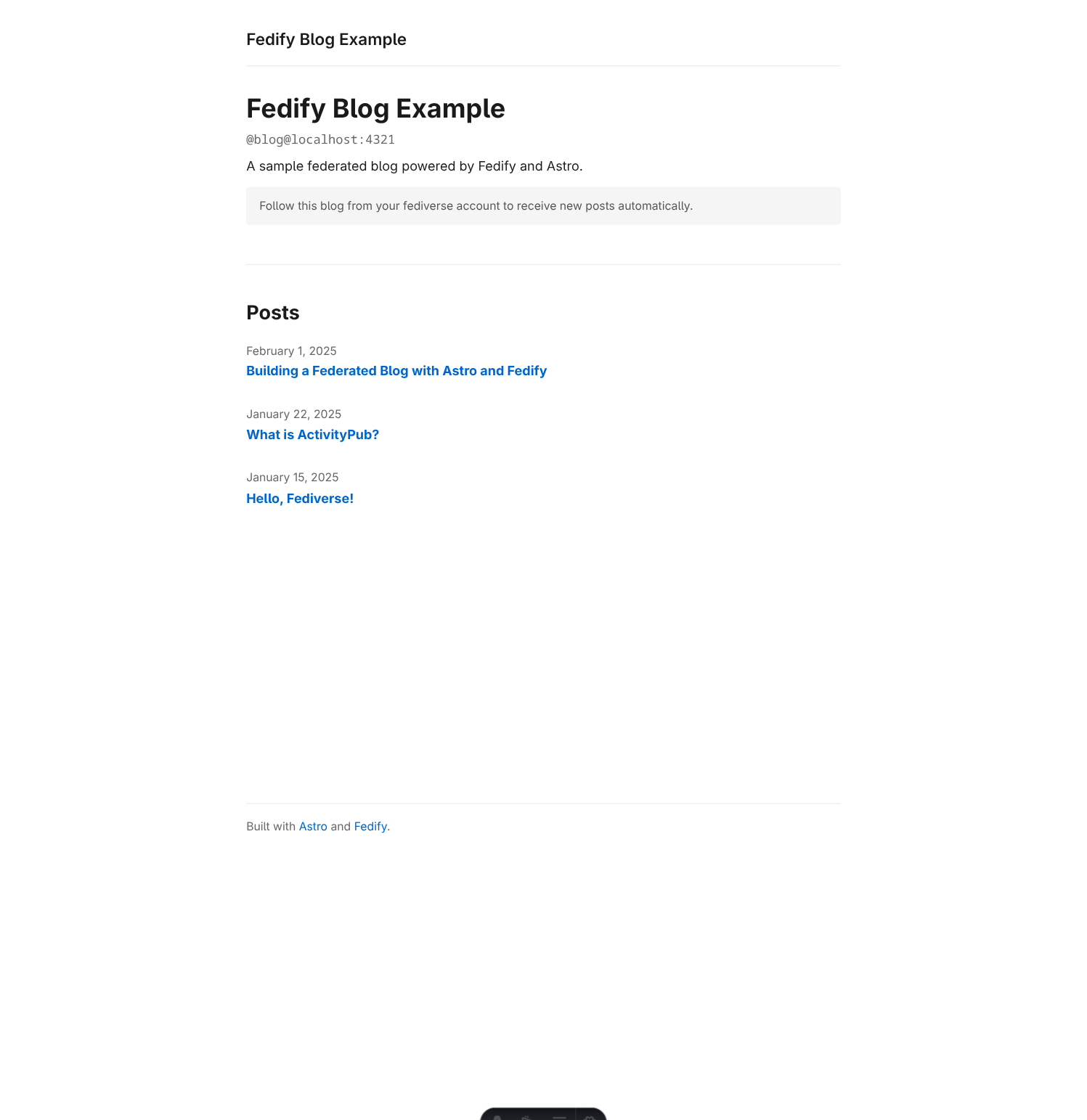
bun run devOpen http://localhost:4321/users/blog in your browser. You should see the actor profile page with the blog name, handle, and post list:
Now test the ActivityPub response. Open a new terminal and run:
fedify lookup http://localhost:4321/users/blogYou should see output like this:
✔ Looking up the object...
Person {
  id: URL "http://localhost:4321/users/blog",
  name: "Fedify Blog Example",
  summary: "A sample federated blog powered by Fedify and Astro.",
  url: URL "http://localhost:4321/",
  preferredUsername: "blog",
  publicKey: CryptographicKey {
    id: URL "http://localhost:4321/users/blog#main-key",
    owner: URL "http://localhost:4321/users/blog",
    publicKey: CryptoKey { ... },
  },
  ...
}
NOTE
If fedify lookup returns an error about a private or localhost address, add the -p/--allow-private-address flag:
fedify lookup -p http://localhost:4321/users/blogThe blog now has a valid ActivityPub identity. However, it can't receive follows or deliver posts to the fediverse yet—those features require a public URL, which we'll set up next.
Interoperating with Mastodon
So far we've verified the actor endpoint works locally. Now let's confirm it's recognizable to other ActivityPub software—in this case, Mastodon. To do that, we need a publicly reachable HTTPS URL.
In this chapter you'll first expose your local server through a tunnel, then update the middleware and Astro configuration so the server works correctly behind that public URL.
Exposing the server with fedify tunnel
The fedify CLI includes a built-in tunneling command that creates a secure public URL pointing at your local server:
fedify tunnel 4321You'll see output like this after a few seconds:
✔ Tunnel is ready!
  Public URL: https://3f8a2b1c4d5e6f.lhr.life/
NOTE
The tunnel uses one of several free tunneling services (localhost.run, serveo.net, or pinggy.io). The URL changes each time you run the command. Once you've introduced SQLite persistence (in a later chapter), delete blog.db whenever the tunnel URL changes—otherwise the ActivityPub IDs stored in the database (actor URL, post URLs) will reference the old origin and remote servers may reject or deduplicate activities incorrectly.
Keep the tunnel running in a separate terminal while you continue testing.
However, there's one more thing to do. The tunnel terminates HTTPS and forwards plain HTTP to your local server. Without extra configuration, Fedify would generate http:// actor IDs rather than https://, which other servers will reject.
To fix this, update src/middleware.ts to rewrite the request URL based on the X-Forwarded-Proto and X-Forwarded-Host headers that the tunnel sets:
import { fedifyMiddleware } from "@fedify/astro";
import type { MiddlewareHandler } from "astro";
import federation from "./federation.ts";
import "./logging.ts";

export const onRequest: MiddlewareHandler = (context, next) => {
  // Rewrite the request URL based on X-Forwarded-Proto / X-Forwarded-Host
  // when running behind a reverse proxy or tunnel (e.g. `fedify tunnel`).
  const proto = context.request.headers.get("x-forwarded-proto");
  const host = context.request.headers.get("x-forwarded-host");
  const url = new URL(context.request.url);
  if (proto != null && url.protocol !== `${proto}:`) url.protocol = proto;
  if (host != null && url.host !== host) url.host = host;
  if (proto != null || host != null) {
    context.request = new Request(url.toString(), context.request);
  }
  return fedifyMiddleware(federation, (_ctx) => undefined)(context, next);
};
The X-Forwarded-Proto header carries the original scheme (https), and X-Forwarded-Host carries the original hostname (your tunnel domain). Together they ensure Fedify generates fully correct actor and object URLs.
Also update astro.config.ts to allow requests from external hostnames (the tunnel assigns a different hostname than localhost):
import node from "@astrojs/node";
import { fedifyIntegration } from "@fedify/astro";
import { defineConfig } from "astro/config";

export default defineConfig({
  integrations: [fedifyIntegration()],
  output: "server",
  adapter: node({ mode: "standalone" }),
  security: {
    // Trust any forwarded host so the server works correctly behind a
    // reverse proxy or tunnel (e.g. `fedify tunnel`, Cloudflare Tunnel).
    allowedDomains: [{}],
  },
  vite: {
    server: {
      allowedHosts: true,
    },
  },
});
security.allowedDomains tells Astro's standalone server to trust X-Forwarded-Host. Setting it to [{}] (an object with no properties) matches any domain. Without this, the server ignores X-Forwarded-Host and Fedify falls back to localhost in all generated URLs, which other fediverse servers can't reach.
WARNING
Trusting all forwarded headers (allowedDomains: [{}]) is only safe when the server is exclusively reachable through a trusted reverse proxy or tunnel that sets X-Forwarded-Host correctly. If the server were directly accessible from the internet, a malicious client could forge X-Forwarded-Host and cause Fedify to generate incorrect ActivityPub IDs. For a production deployment behind a known proxy (e.g. Fly.io), you can restrict allowedDomains to the exact hostname(s) your proxy uses.
WARNING
allowedHosts: true disables Vite's host checking. This is fine for local development where only you control the server. Do not use this setting in production—Astro uses a different server configuration when built for deployment.
Restart the dev server after these changes. Now run fedify lookup with the tunnel URL to confirm the actor ID uses https://:
fedify lookup https://3f8a2b1c4d5e6f.lhr.life/users/blogYou should see:
✔ Looking up the object...
Person {
  id: URL "https://3f8a2b1c4d5e6f.lhr.life/users/blog",
  name: "Fedify Blog Example",
  ...
}
Searching for the blog on ActivityPub.Academy
With the server publicly accessible, head to ActivityPub.Academy—a sandbox Mastodon instance designed for ActivityPub testing. Unlike a regular Mastodon server, ActivityPub.Academy issues a temporary anonymous account on the spot: there is no email or password. Accounts are automatically deleted after 24 hours, but you can always create a fresh one.
To get an account, check I have read and agree to the privacy policy and click Sign up:

Once signed in, type the blog's handle into the search box and press Enter:
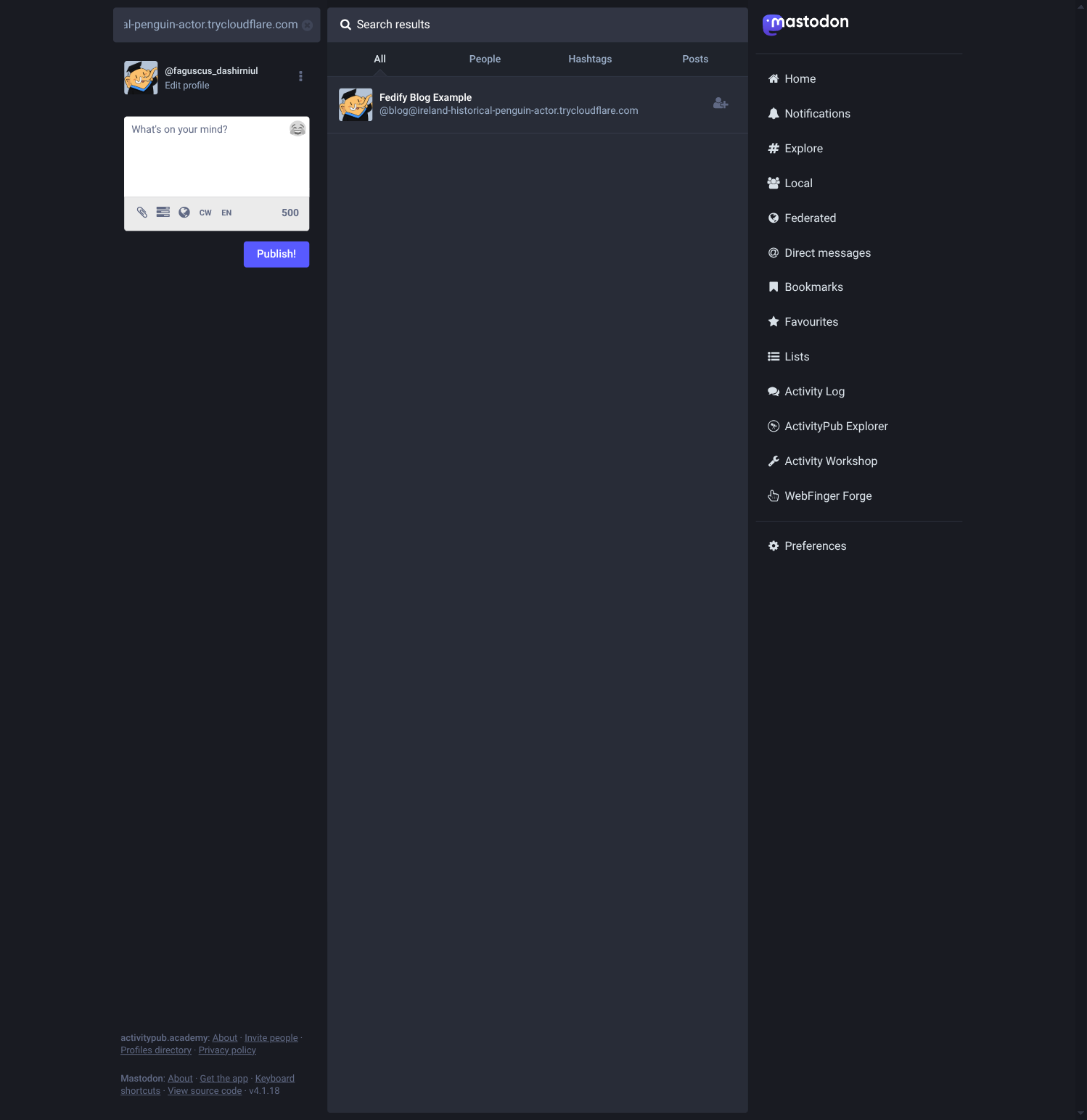
@blog@3f8a2b1c4d5e6f.lhr.lifeActivityPub.Academy sends a WebFinger lookup to your server to resolve the handle. You should see the blog appear in the search results:
NOTE
You must be signed in for remote actor resolution to work. Unauthenticated searches only show locally cached results, so the blog won't appear if you search without logging in first.
Click the blog's profile to confirm all the metadata looks correct:
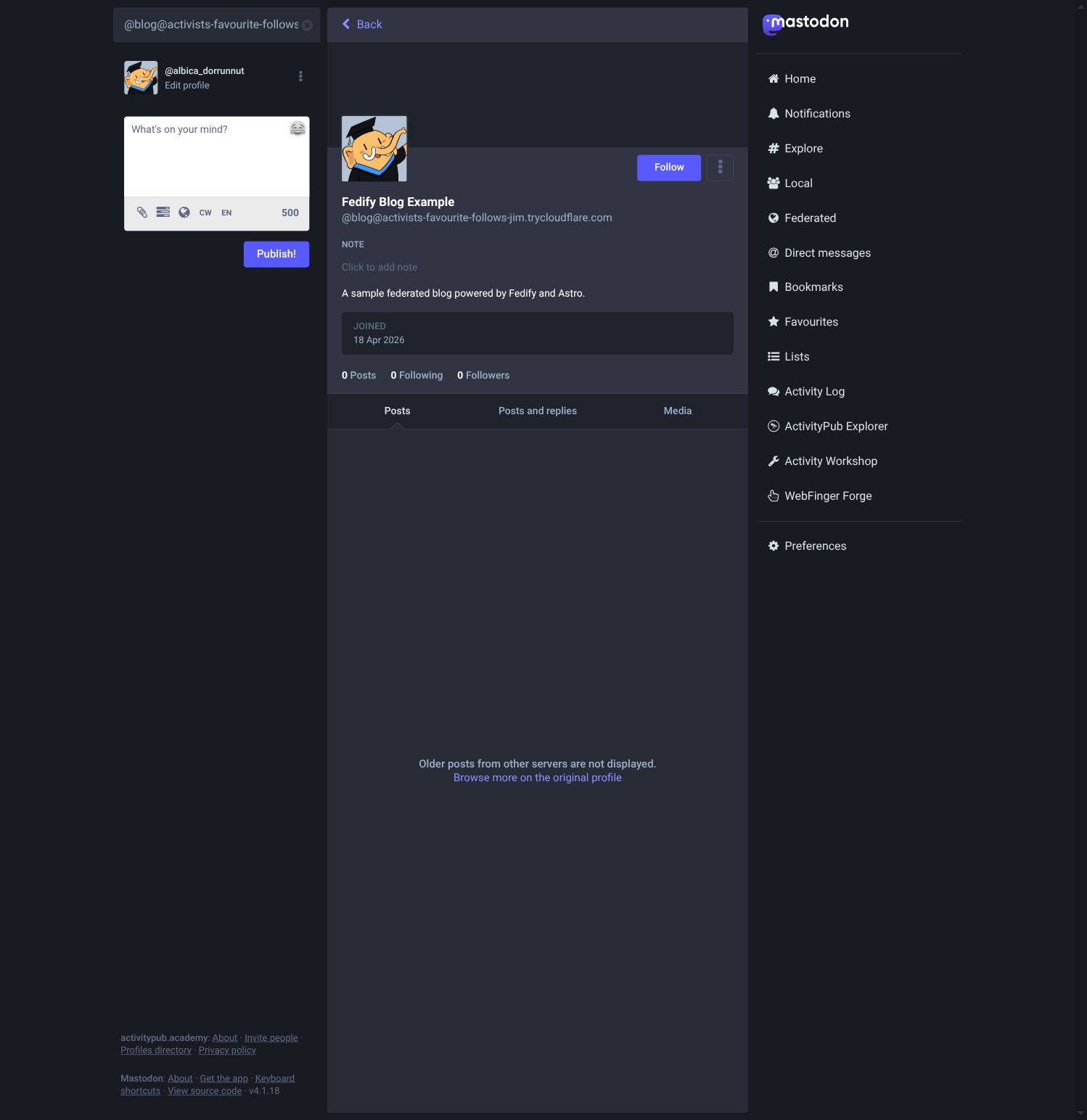
The blog is now discoverable across the fediverse. In the next chapter we'll implement inbox listeners so it can actually receive and respond to Follow activities.
Implementing followers
Our blog actor is now discoverable, but if a remote user tries to follow it, nothing happens—we haven't implemented the inbox yet. In this chapter we'll handle Follow activities (auto-accepting them and storing followers) and Undo(Follow) activities (removing followers). We'll also display the follower count on the home page.
Updating the federation module
Replace src/federation.ts with the following:
import {
  createFederation,
  generateCryptoKeyPair,
  InProcessMessageQueue,
  MemoryKvStore,
} from "@fedify/fedify";
import { Accept, Endpoints, Follow, Person, Undo } from "@fedify/vocab";
import { getLogger } from "@logtape/logtape";
import { followers, keyPairs } from "./lib/store.ts";

const logger = getLogger("astro-blog");

export const BLOG_IDENTIFIER = "blog";
export const BLOG_NAME = "Fedify Blog Example";
export const BLOG_SUMMARY =
  "A sample federated blog powered by Fedify and Astro.";

const federation = createFederation({
  kv: new MemoryKvStore(),
  queue: new InProcessMessageQueue(),
});

federation
  .setActorDispatcher("/users/{identifier}", async (ctx, identifier) => {
    if (identifier !== BLOG_IDENTIFIER) {
      logger.debug("Unknown actor identifier: {identifier}", { identifier });
      return null;
    }
    const kp = await ctx.getActorKeyPairs(identifier);
    return new Person({
      id: ctx.getActorUri(identifier),
      preferredUsername: identifier,
      name: BLOG_NAME,
      summary: BLOG_SUMMARY,
      url: new URL("/", ctx.url),
      inbox: ctx.getInboxUri(identifier),
      endpoints: new Endpoints({
        sharedInbox: ctx.getInboxUri(),
      }),
      followers: ctx.getFollowersUri(identifier),
      publicKey: kp[0].cryptographicKey,
      assertionMethods: kp.map((k) => k.multikey),
    });
  })
  .setKeyPairsDispatcher(async (_ctx, identifier) => {
    if (identifier !== BLOG_IDENTIFIER) return [];
    const stored = keyPairs.get(identifier);
    if (stored) return stored;
    const [rsaKey, ed25519Key] = await Promise.all([
      generateCryptoKeyPair("RSASSA-PKCS1-v1_5"),
      generateCryptoKeyPair("Ed25519"),
    ]);
    const kp = [rsaKey, ed25519Key];
    keyPairs.set(identifier, kp);
    return kp;
  });

federation
  .setInboxListeners("/users/{identifier}/inbox", "/inbox")
  .on(Follow, async (ctx, follow) => {
    if (follow.id == null || follow.actorId == null) return;
    const parsed = ctx.parseUri(follow.objectId);
    if (parsed?.type !== "actor" || parsed.identifier !== BLOG_IDENTIFIER) {
      return;
    }
    const follower = await follow.getActor(ctx);
    if (follower == null || follower.id == null || follower.inboxId == null) {
      return;
    }
    followers.set(follower.id.href, follower.inboxId.href);
    logger.info("New follower: {follower}", { follower: follower.id.href });
    await ctx.sendActivity(
      { identifier: BLOG_IDENTIFIER },
      follower,
      new Accept({
        id: new URL(
          `#accepts/${follower.id.href}`,
          ctx.getActorUri(BLOG_IDENTIFIER),
        ),
        actor: ctx.getActorUri(BLOG_IDENTIFIER),
        object: follow,
      }),
    );
  })
  .on(Undo, async (ctx, undo) => {
    const object = await undo.getObject(ctx);
    if (!(object instanceof Follow)) return;
    if (object.objectId?.href !== ctx.getActorUri(BLOG_IDENTIFIER).href) return;
    if (undo.actorId == null) return;
    followers.delete(undo.actorId.href);
    logger.info("Unfollowed: {actor}", { actor: undo.actorId.href });
  });

federation.setFollowersDispatcher(
  "/users/{identifier}/followers",
  (_ctx, identifier) => {
    if (identifier !== BLOG_IDENTIFIER) return null;
    const items = Array.from(followers.entries()).map(([id, inboxId]) => ({
      id: new URL(id),
      inboxId: new URL(inboxId),
    }));
    return { items };
  },
);

export default federation;
Let's walk through the new pieces:
Importing Accept, Follow, and Undo from @fedify/vocab gives us the activity types we need to handle. We also import followers from the store.
.on(Follow, ...) registers a handler for incoming Follow activities. When someone follows the blog:
- We use
ctx.parseUri(follow.objectId)to confirm they're following our blog actor (not some other actor). - We call
follow.getActor(ctx)to fetch the follower's actor document—this gives us theiridandinboxId. - We store the follower in the
followersmap. - We send back an
Accept(Follow)activity to confirm the follow. Without this, the follow request stays pending on the remote server.
.on(Undo, ...) handles Undo(Follow) activities, which are sent when someone unfollows. We use undo.getObject(ctx) to retrieve the original Follow activity. If it's a Follow, we remove the actor from the followers map.
setFollowersDispatcher now returns the real follower list instead of an empty array. Each item needs both an id (the actor's URL) and an inboxId (where to deliver activities)—Fedify uses these when sending activities to all followers.
Showing follower count on the home page
Update src/pages/index.astro to display the follower count and a link to the actor profile:
---
import { getCollection } from "astro:content";
import { BLOG_IDENTIFIER, BLOG_NAME } from "../federation.ts";
import { followers } from "../lib/store.ts";
import Layout from "../layouts/Layout.astro";
const allPosts = await getCollection("posts");
const posts = allPosts
.filter((post) => !post.data.draft)
.sort((a, b) => b.data.pubDate.getTime() - a.data.pubDate.getTime());
Testing with ActivityPub.Academy
To test the follow flow, we need a real ActivityPub server to send Follow activities to our blog. ActivityPub.Academy is a sandbox Mastodon instance designed specifically for this purpose.
Make sure the dev server is running and the tunnel is active:
bun run dev
# In a separate terminal:
fedify tunnel 4321
On ActivityPub.Academy, sign in (or create a test account) and search for your blog's handle:
@blog@3f8a2b1c4d5e6f.lhr.lifeClick Follow. Within a second or two, you should see a log message in your dev server terminal:
18:42:01.123 INF astro-blog New follower: https://activitypub.academy/users/testuserRefresh the home page—the follower count should now read 1 follower:
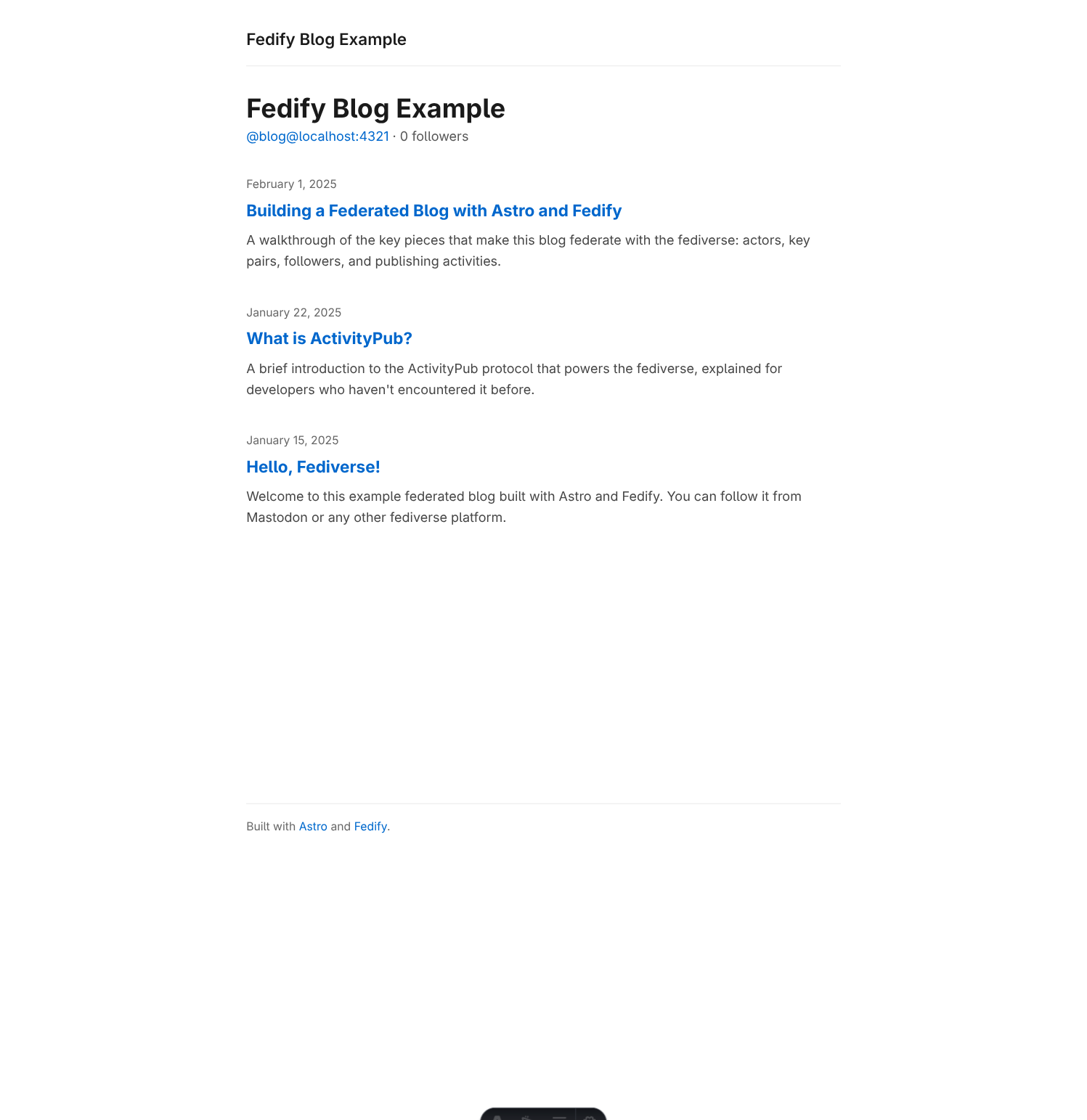
To test unfollowing, click Unfollow on ActivityPub.Academy. The follower count should drop back to 0.
NOTE
Followers are stored in memory and are lost when you restart the server. We'll fix this in the next chapter when we migrate to SQLite.
Persisting data with SQLite
Our blog now handles followers—but there is a catch. Every time you restart the dev server, both the key pairs and the follower list vanish. This means the blog appears under a different public key after each restart, which causes all remote servers to reject its HTTP signatures. Followers accumulated during a previous run are also gone, so the blog can no longer notify them of new posts.
The fix is straightforward: persist everything in a SQLite database that survives restarts. Bun ships with bun:sqlite, a zero-dependency, high-speed SQLite driver, so we don't need to install anything new.
Adding bun-types
bun:sqlite is a Bun built-in module. Its TypeScript declarations are shipped in the bun-types package. Install it as a dev dependency:
bun add -d bun-typesThen tell TypeScript to include those declarations by adding a compilerOptions block to tsconfig.json:
{
  "extends": "astro/tsconfigs/strict",
  "compilerOptions": {
    "types": ["bun-types"]
  },
  "include": [".astro/types.d.ts", "**/*"],
  "exclude": ["dist"]
}
Creating the database module
Create a new file src/lib/db.ts that opens the database and defines the schema:
import { Database } from "bun:sqlite";

const db = new Database("blog.db");

db.run(`
  CREATE TABLE IF NOT EXISTS key_pairs (
    identifier TEXT NOT NULL,
    algorithm  TEXT NOT NULL,
    private_key BLOB NOT NULL,
    public_key  BLOB NOT NULL,
    PRIMARY KEY (identifier, algorithm)
  )
`);

db.run(`
  CREATE TABLE IF NOT EXISTS followers (
    actor_id  TEXT PRIMARY KEY,
    inbox_url TEXT NOT NULL
  )
`);

export default db;
new Database("blog.db") creates blog.db in the project root on the first run and reopens it on subsequent runs. The CREATE TABLE IF NOT EXISTS statements are idempotent, so they run safely every time the server starts.
The schema has two tables:
key_pairsstores one row per cryptographic key. The composite primary key(identifier, algorithm)lets us store both the RSA-PKCS1-v1_5 and Ed25519 keys for the same actor. Private and public key material are kept as raw binary (BLOB) using the standard PKCS#8 and SPKI formats.followersmaps each follower's actor URL (actor_id) to their inbox URL (inbox_url). The actor URL is the primary key so that a secondFollowfrom the same actor simply overwrites the row.
Migrating the store
Replace the entire contents of src/lib/store.ts with SQLite-backed functions:
import db from "./db.ts";

export async function getKeyPairs(
  identifier: string,
): Promise<CryptoKeyPair[] | null> {
  const rows = db
    .query<
      { algorithm: string; private_key: Uint8Array; public_key: Uint8Array },
      [string]
    >(
      `SELECT algorithm, private_key, public_key
       FROM key_pairs WHERE identifier = ? ORDER BY rowid`,
    )
    .all(identifier);
  if (rows.length === 0) return null;
  return Promise.all(
    rows.map(async ({ algorithm, private_key, public_key }) => {
      const alg: AlgorithmIdentifier | RsaHashedImportParams =
        algorithm === "RSASSA-PKCS1-v1_5"
          ? { name: "RSASSA-PKCS1-v1_5", hash: "SHA-256" }
          : algorithm;
      const [privateKey, publicKey] = await Promise.all([
        crypto.subtle.importKey(
          "pkcs8",
          private_key as unknown as Uint8Array<ArrayBuffer>,
          alg,
          true,
          ["sign"],
        ),
        crypto.subtle.importKey(
          "spki",
          public_key as unknown as Uint8Array<ArrayBuffer>,
          alg,
          true,
          ["verify"],
        ),
      ]);
      return { privateKey, publicKey };
    }),
  );
}

export async function saveKeyPairs(
  identifier: string,
  kp: CryptoKeyPair[],
): Promise<void> {
  const insert = db.prepare(
    `INSERT OR REPLACE INTO key_pairs
     (identifier, algorithm, private_key, public_key) VALUES (?, ?, ?, ?)`,
  );
  for (const { privateKey, publicKey } of kp) {
    const [privateKeyData, publicKeyData] = await Promise.all([
      crypto.subtle.exportKey("pkcs8", privateKey),
      crypto.subtle.exportKey("spki", publicKey),
    ]);
    insert.run(
      identifier,
      privateKey.algorithm.name,
      new Uint8Array(privateKeyData),
      new Uint8Array(publicKeyData),
    );
  }
}

export function addFollower(actorId: string, inboxUrl: string): void {
  db.run(
    `INSERT OR REPLACE INTO followers (actor_id, inbox_url) VALUES (?, ?)`,
    [actorId, inboxUrl],
  );
}

export function removeFollower(actorId: string): void {
  db.run(`DELETE FROM followers WHERE actor_id = ?`, [actorId]);
}

export function countFollowers(): number {
  return (
    db
      .query<{ count: number }, []>(
        `SELECT COUNT(*) AS count FROM followers`,
      )
      .get()?.count ?? 0
  );
}

export function getFollowers(): { id: URL; inboxId: URL }[] {
  return db
    .query<{ actor_id: string; inbox_url: string }, []>(
      `SELECT actor_id, inbox_url FROM followers`,
    )
    .all()
    .map(({ actor_id, inbox_url }) => ({
      id: new URL(actor_id),
      inboxId: new URL(inbox_url),
    }));
}
A few things worth noting here:
Key serialization:
CryptoKeyobjects exist only in memory—they cannot be stored directly. We export private keys withcrypto.subtle.exportKeyusing the PKCS#8 format and public keys using the SPKI format, both of which produceArrayBuffervalues that SQLite stores as BLOBs. On the way back we callcrypto.subtle.importKeywith the reverse formats. RSA keys also need the hash algorithm (SHA-256) specified at import time, so we branch on the algorithm name stored in the row.BLOB return type: Bun's SQLite driver returns BLOB columns as
Uint8Array<ArrayBufferLike>, but the Web Crypto API'simportKeyexpectsUint8Array<ArrayBuffer>. The difference is purely a TypeScript typing issue—the underlying bytes are identical—so we silence it withas unknown as Uint8Array<ArrayBuffer>.Synchronous followers: Unlike key pairs, follower operations don't involve any cryptography, so the four follower functions (
addFollower,removeFollower,countFollowers,getFollowers) are plain synchronous functions.
Updating the federation module
src/federation.ts now imports functions from the new store instead of Map objects. Replace the import line and update the two dispatcher bodies:
import {
  createFederation,
  generateCryptoKeyPair,
  InProcessMessageQueue,
  MemoryKvStore,
} from "@fedify/fedify";
import { Accept, Endpoints, Follow, Person, Undo } from "@fedify/vocab";
import { getLogger } from "@logtape/logtape";
import {
  addFollower,
  getFollowers,
  getKeyPairs,
  removeFollower,
  saveKeyPairs,
} from "./lib/store.ts";

const logger = getLogger("astro-blog");

export const BLOG_IDENTIFIER = "blog";
export const BLOG_NAME = "Fedify Blog Example";
export const BLOG_SUMMARY =
  "A sample federated blog powered by Fedify and Astro.";

const federation = createFederation({
  kv: new MemoryKvStore(),
  queue: new InProcessMessageQueue(),
});

federation
  .setActorDispatcher("/users/{identifier}", async (ctx, identifier) => {
    if (identifier !== BLOG_IDENTIFIER) {
      logger.debug("Unknown actor identifier: {identifier}", { identifier });
      return null;
    }
    const kp = await ctx.getActorKeyPairs(identifier);
    return new Person({
      id: ctx.getActorUri(identifier),
      preferredUsername: identifier,
      name: BLOG_NAME,
      summary: BLOG_SUMMARY,
      url: new URL("/", ctx.url),
      inbox: ctx.getInboxUri(identifier),
      endpoints: new Endpoints({
        sharedInbox: ctx.getInboxUri(),
      }),
      followers: ctx.getFollowersUri(identifier),
      publicKey: kp[0].cryptographicKey,
      assertionMethods: kp.map((k) => k.multikey),
    });
  })
  .setKeyPairsDispatcher(async (_ctx, identifier) => {
    if (identifier !== BLOG_IDENTIFIER) return [];
    const stored = await getKeyPairs(identifier);
    if (stored) return stored;
    const [rsaKey, ed25519Key] = await Promise.all([
      generateCryptoKeyPair("RSASSA-PKCS1-v1_5"),
      generateCryptoKeyPair("Ed25519"),
    ]);
    const kp = [rsaKey, ed25519Key];
    await saveKeyPairs(identifier, kp);
    return kp;
  });

federation
  .setInboxListeners("/users/{identifier}/inbox", "/inbox")
  .on(Follow, async (ctx, follow) => {
    if (follow.id == null || follow.actorId == null) return;
    const parsed = ctx.parseUri(follow.objectId);
    if (parsed?.type !== "actor" || parsed.identifier !== BLOG_IDENTIFIER) {
      return;
    }
    const follower = await follow.getActor(ctx);
    if (follower == null || follower.id == null || follower.inboxId == null) {
      return;
    }
    addFollower(follower.id.href, follower.inboxId.href);
    logger.info("New follower: {follower}", { follower: follower.id.href });
    await ctx.sendActivity(
      { identifier: BLOG_IDENTIFIER },
      follower,
      new Accept({
        id: new URL(
          `#accepts/${follower.id.href}`,
          ctx.getActorUri(BLOG_IDENTIFIER),
        ),
        actor: ctx.getActorUri(BLOG_IDENTIFIER),
        object: follow,
      }),
    );
  })
  .on(Undo, async (ctx, undo) => {
    const object = await undo.getObject(ctx);
    if (!(object instanceof Follow)) return;
    if (object.objectId?.href !== ctx.getActorUri(BLOG_IDENTIFIER).href) return;
    if (undo.actorId == null) return;
    removeFollower(undo.actorId.href);
    logger.info("Unfollowed: {actor}", { actor: undo.actorId.href });
  });

federation.setFollowersDispatcher(
  "/users/{identifier}/followers",
  (_ctx, identifier) => {
    if (identifier !== BLOG_IDENTIFIER) return null;
    return { items: getFollowers() };
  },
);

export default federation;
The key changes are:
keyPairs.get(identifier)→await getKeyPairs(identifier)keyPairs.set(identifier, kp)→await saveKeyPairs(identifier, kp)followers.set(...)→addFollower(...)followers.delete(...)→removeFollower(...)Array.from(followers.entries()).map(...)→getFollowers()
Updating the home page
src/pages/index.astro used to read followers.size directly from the in-memory Map. Now it calls countFollowers():
---
import { getCollection } from "astro:content";
import { BLOG_IDENTIFIER, BLOG_NAME } from "../federation.ts";
import Layout from "../layouts/Layout.astro";
import { countFollowers } from "../lib/store.ts";

const allPosts = await getCollection("posts");
const posts = allPosts
  .filter((post) => !post.data.draft)
  .sort((a, b) => b.data.pubDate.getTime() - a.data.pubDate.getTime());

const followerCount = countFollowers();
const handle = `@${BLOG_IDENTIFIER}@${Astro.url.host}`;
---
Trying it out
Restart the dev server and follow the blog from ActivityPub.Academy (using a tunnel as described in the previous chapters). Stop the server, restart it, and verify that:
- The follower count on the home page still shows the correct number.
fedify lookup http://localhost:4321/users/blogreturns the same actor with the same key fingerprints as before the restart.
You should see a blog.db file appear in the project root after the first run. This file contains both your persistent key material and the follower list.
TIP
Add blog.db to .gitignore to avoid committing your private keys to version control:
echo "blog.db" >> .gitignorePublishing posts
The blog now survives restarts—but followers still don't see its posts. In this chapter we'll add a startup sync that compares the current Astro content collection against the SQLite posts table and sends the appropriate ActivityPub activities to all followers.
The mechanism works like this:
- A post that exists in the collection but not in the database is new: send
Create(Article). - A post that exists in both but whose content has changed is updated: send
Update(Article). - A post that exists in the database but not in the collection has been deleted: send
Delete(Article).
After sending, the database is brought in sync. On the next restart, unchanged posts produce no activity.
What is an article?
In ActivityPub, a blog post is represented as an Article object. The vocabulary defines several standard properties for it:
id— the ActivityPub object ID (also the URL that content-negotiates between HTML and JSON-LD)attribution— the actor who wrote the postname— the post titlesummary— a short descriptioncontent— an HTML representation of the post (in this tutorial, just the description wrapped in<p>tags rather than the full body)url— the canonical URL of the HTML page (same asidin our case)published— the publication date as aTemporal.Instant
Adding the posts table
Open src/lib/db.ts and add the posts table at the end:
db.run(`
  CREATE TABLE IF NOT EXISTS posts (
    id           TEXT PRIMARY KEY,
    title        TEXT NOT NULL,
    url          TEXT NOT NULL,
    content_hash TEXT NOT NULL,
    published_at TEXT NOT NULL
  )
`);

export default db;
The id column stores the Astro content collection slug (e.g., hello-fediverse). url is the ActivityPub ID of the Article—it doubles as the HTML page URL since we'll share the path /posts/{slug} between Astro and Fedify via content negotiation. content_hash is a SHA-256 digest of the title and body, used to detect edits.
Adding @js-temporal/polyfill
The Article object uses Temporal.Instant from the TC39 Temporal proposal polyfill. Although @fedify/vocab already depends on this package, you should list it directly in your project so the version stays under your control:
bun add @js-temporal/polyfillAdding an article object dispatcher
When a remote server receives a Create(Article) activity, it will dereference the Article.id URL to fetch the full object. Without an object dispatcher, Fedify would return 404.
Add the following dispatcher to src/federation.ts (just before export default federation):
federation.setObjectDispatcher(
  Article,
  "/posts/{slug}",
  async (ctx, { slug }) => {
    const allPosts = await getCollection("posts");
    const post = allPosts.find((p) => p.id === slug && !p.data.draft);
    if (!post) return null;
    return new Article({
      id: ctx.getObjectUri(Article, { slug }),
      attribution: ctx.getActorUri(BLOG_IDENTIFIER),
      name: post.data.title,
      summary: post.data.description,
      content: `<p>${post.data.description}</p>`,
      url: new URL(`/posts/${slug}`, ctx.url),
      published: Temporal.Instant.from(post.data.pubDate.toISOString()),
    });
  },
);

export default federation;
setObjectDispatcher registers a path pattern (/posts/{slug}) and a callback that returns the ActivityPub object for that path. The { slug } destructuring extracts the path parameter.
ctx.getObjectUri(Article, { slug }) generates the canonical ActivityPub ID for the Article, e.g. https://example.com/posts/hello-fediverse. This is the same URL as the HTML page—content negotiation (via the Accept header) determines which representation is served:
- Browser sends
Accept: text/html, */*→ Astro renders the HTML page - ActivityPub client sends
Accept: application/activity+json→ Fedify returns JSON-LD
The @fedify/astro middleware handles this negotiation automatically.
Creating the publish module
Create src/lib/publish.ts:
import type { RequestContext } from "@fedify/fedify";
import { Article, Create, Delete, Update } from "@fedify/vocab";
import { Temporal } from "@js-temporal/polyfill";
import { getCollection } from "astro:content";
import { BLOG_IDENTIFIER } from "../federation.ts";
import db from "./db.ts";

async function hashPost(
  title: string,
  description: string,
  body: string,
): Promise<string> {
  const data = new TextEncoder().encode(`${title}\n${description}\n${body}`);
  const buf = await crypto.subtle.digest("SHA-256", data);
  return [...new Uint8Array(buf)]
    .map((b) => b.toString(16).padStart(2, "0"))
    .join("");
}

const AS_PUBLIC = new URL("https://www.w3.org/ns/activitystreams#Public");

export async function syncPosts(
  ctx: RequestContext<unknown>,
): Promise<void> {
  const allPosts = await getCollection("posts");
  const current = allPosts.filter((p) => !p.data.draft);

  type DbPost = { id: string; content_hash: string; url: string };
  const storedRows = db
    .query<DbPost, []>("SELECT id, content_hash, url FROM posts")
    .all();
  const stored = new Map(storedRows.map((r) => [r.id, r]));

  const actorUri = ctx.getActorUri(BLOG_IDENTIFIER);
  const currentIds = new Set<string>();

  for (const post of current) {
    const slug = post.id;
    currentIds.add(slug);

    const articleId = ctx.getObjectUri(Article, { slug });
    const contentHash = await hashPost(
      post.data.title,
      post.data.description,
      post.body ?? "",
    );

    const article = new Article({
      id: articleId,
      attribution: actorUri,
      name: post.data.title,
      summary: post.data.description,
      content: `<p>${post.data.description}</p>`,
      url: new URL(`/posts/${slug}`, ctx.url),
      published: Temporal.Instant.from(post.data.pubDate.toISOString()),
    });

    if (!stored.has(slug)) {
      await ctx.sendActivity(
        { identifier: BLOG_IDENTIFIER },
        "followers",
        new Create({
          id: new URL(`#create-${Date.now()}`, articleId),
          actor: actorUri,
          to: AS_PUBLIC,
          object: article,
        }),
      );
      db.run(
        `INSERT INTO posts (id, title, url, content_hash, published_at)
         VALUES (?, ?, ?, ?, ?)`,
        [
          slug,
          post.data.title,
          articleId.href,
          contentHash,
          post.data.pubDate.toISOString(),
        ],
      );
    } else if (stored.get(slug)?.content_hash !== contentHash) {
      await ctx.sendActivity(
        { identifier: BLOG_IDENTIFIER },
        "followers",
        new Update({
          id: new URL(`#update-${Date.now()}`, articleId),
          actor: actorUri,
          to: AS_PUBLIC,
          object: article,
        }),
      );
      db.run(
        `UPDATE posts SET title = ?, content_hash = ?, published_at = ?
         WHERE id = ?`,
        [post.data.title, contentHash, post.data.pubDate.toISOString(), slug],
      );
    }
  }

  for (const [slug, row] of stored) {
    if (!currentIds.has(slug)) {
      await ctx.sendActivity(
        { identifier: BLOG_IDENTIFIER },
        "followers",
        new Delete({
          id: new URL(`#delete-${slug}-${Date.now()}`, actorUri),
          actor: actorUri,
          to: AS_PUBLIC,
          object: new URL(row.url),
        }),
      );
      db.run("DELETE FROM posts WHERE id = ?", [slug]);
    }
  }
}
A few things to unpack here:
hashPost computes a SHA-256 digest of the title, description, and body concatenated together. Any change to those fields will produce a different hash, triggering an Update(Article) activity.
AS_PUBLIC is the ActivityPub public addressing URL. Activities addressed to this URL are publicly visible on fediverse clients.
"followers" passed as the recipients argument tells Fedify to look up the blog's followers collection and fan the activity out to all of them. Fedify calls the followers dispatcher you registered earlier, so you no longer need to call getFollowers() manually here. When the followers list is empty, Fedify simply sends nothing.
The loop iterates over current non-draft posts and checks the SQLite table:
!stored.has(slug)→ new post →Create(Article)stored.get(slug)?.content_hash !== contentHash→ changed post →Update(Article)- Remaining slugs in
storedthat are not incurrent→ deleted post →Delete(Article)
Triggering the sync on startup
Modify src/middleware.ts to call syncPosts once, on the first HTTP request, right after the X-Forwarded-Proto/X-Forwarded-Host rewrite:
import { fedifyMiddleware } from "@fedify/astro";
import type { MiddlewareHandler } from "astro";
import federation from "./federation.ts";
import { syncPosts } from "./lib/publish.ts";
import "./logging.ts";

let synced = false;

export const onRequest: MiddlewareHandler = (context, next) => {
  // Rewrite the request URL based on X-Forwarded-Proto / X-Forwarded-Host
  // when running behind a reverse proxy or tunnel (e.g. `fedify tunnel`).
  const proto = context.request.headers.get("x-forwarded-proto");
  const host = context.request.headers.get("x-forwarded-host");
  const url = new URL(context.request.url);
  if (proto != null && url.protocol !== `${proto}:`) url.protocol = proto;
  if (host != null && url.host !== host) url.host = host;
  if (proto != null || host != null) {
    context.request = new Request(url.toString(), context.request);
  }
  if (!synced && context.request.headers.get("x-forwarded-host") != null) {
    synced = true;
    const ctx = federation.createContext(context.request, undefined);
    syncPosts(ctx).catch((err) => {
      console.error("Failed to sync posts:", err);
      synced = false;
    });
  }
  return fedifyMiddleware(federation, (_ctx) => undefined)(context, next);
};
federation.createContext(request, contextData) creates a Fedify RequestContext from the current HTTP request. The context knows the server's public URL (including scheme and host), which it uses to generate correct ActivityPub IDs for the activities it sends. Because the X-Forwarded-Proto/X-Forwarded-Host rewrite already runs before this point, context.request always carries the correct public URL when the request arrives through the tunnel.
syncPosts(ctx) is fired and not awaited, so it runs in the background while the response is served immediately. The synced flag guards against double-firing: it is set on the first request that arrives with an X-Forwarded-Host header (i.e., the first tunnel request), and reset to false if syncPosts throws so that a transient failure does not permanently suppress activity delivery.
TIP
In production you could also trigger syncPosts from a startup script or a deploy hook. The fire-and-forget pattern shown here is simplest for a development tutorial.
Testing
Follow the blog from ActivityPub.Academy (tunnel still required). Then add a new post file to src/content/posts/:
---
title: "A new post"
pubDate: 2025-04-01
description: "This post appears in followers' timelines."
---

Hello, followers!  This is a new post sent via ActivityPub.
Restart the dev server:
bun run devThen open your tunnel URL in a browser (e.g. https://your-tunnel-url.trycloudflare.com/) so that the first request arrives with the correct X-Forwarded-Host header and Fedify generates the right public URLs for the activities it sends.
Within seconds you should see a log line like:
18:42:02.456 INF @fedify/fedify Sent activity Create to ...Check your ActivityPub.Academy timeline—the new post should appear there. The blog title and description are shown (we include the description as content).
To test updates, change the title or description of the new post and restart. To test deletion, remove the file and restart.
Receiving and displaying comments
Followers can now read our posts in their fediverse timelines. In this chapter we'll make the conversation two-way: when someone replies to one of our posts from Mastodon or another fediverse server, we'll store the reply and display it below the post.
Adding the comments table
Open src/lib/db.ts and append a comments table:
db.run(`
  CREATE TABLE IF NOT EXISTS comments (
    id           TEXT PRIMARY KEY,
    post_id      TEXT NOT NULL,
    author_url   TEXT NOT NULL,
    author_name  TEXT NOT NULL,
    content      TEXT NOT NULL,
    published_at TEXT NOT NULL
  )
`);

export default db;
Each row represents one fediverse reply. id is the ActivityPub object ID of the remote Note, and post_id is the slug of the local post it replies to.
Adding comment helpers to the store
Extend src/lib/store.ts with the comment CRUD functions that the inbox handlers will call:
export interface Comment {
  id: string;
  postId: string;
  authorUrl: string;
  authorName: string;
  content: string;
  publishedAt: string;
}

export function addComment(comment: Comment): void {
  db.run(
    `INSERT OR REPLACE INTO comments
     (id, post_id, author_url, author_name, content, published_at)
     VALUES (?, ?, ?, ?, ?, ?)`,
    [
      comment.id,
      comment.postId,
      comment.authorUrl,
      comment.authorName,
      comment.content,
      comment.publishedAt,
    ],
  );
}

export function updateComment(
  id: string,
  authorName: string,
  content: string,
): void {
  db.run(
    `UPDATE comments SET author_name = ?, content = ? WHERE id = ?`,
    [authorName, content, id],
  );
}

export function getCommentAuthorUrl(id: string): string | null {
  return (
    db
      .query<{ author_url: string }, [string]>(
        `SELECT author_url FROM comments WHERE id = ?`,
      )
      .get(id)?.author_url ?? null
  );
}

export function deleteComment(id: string): void {
  db.run(`DELETE FROM comments WHERE id = ?`, [id]);
}

export function getCommentsByPost(postId: string): Comment[] {
  return db
    .query<
      {
        id: string;
        author_url: string;
        author_name: string;
        content: string;
        published_at: string;
      },
      [string]
    >(
      `SELECT id, author_url, author_name, content, published_at
       FROM comments WHERE post_id = ? ORDER BY published_at`,
    )
    .all(postId)
    .map((r) => ({
      id: r.id,
      postId,
      authorUrl: r.author_url,
      authorName: r.author_name,
      content: r.content,
      publishedAt: r.published_at,
    }));
}
addComment uses INSERT OR REPLACE so that receiving the same activity twice (e.g., retries) is idempotent.
getCommentAuthorUrl is a small helper used by the Update and Delete handlers to verify that the actor performing the operation is the original author.
Handling inbox activities
Open src/federation.ts and update the imports and inbox listeners to handle Create(Note), Update(Note), and Delete(Note):
import { getCollection } from "astro:content";
import {
  createFederation,
  generateCryptoKeyPair,
  InProcessMessageQueue,
  MemoryKvStore,
} from "@fedify/fedify";
import {
  Accept,
  Article,
  Create,
  Delete,
  Endpoints,
  Follow,
  Note,
  Person,
  Undo,
  Update,
} from "@fedify/vocab";
import { Temporal } from "@js-temporal/polyfill";
import { getLogger } from "@logtape/logtape";
import {
  addComment,
  addFollower,
  deleteComment,
  getCommentAuthorUrl,
  getFollowers,
  getKeyPairs,
  removeFollower,
  saveKeyPairs,
  updateComment,
} from "./lib/store.ts";

const logger = getLogger("astro-blog");

export const BLOG_IDENTIFIER = "blog";
export const BLOG_NAME = "Fedify Blog Example";
export const BLOG_SUMMARY =
  "A sample federated blog powered by Fedify and Astro.";

const federation = createFederation({
  kv: new MemoryKvStore(),
  queue: new InProcessMessageQueue(),
});

federation
  .setActorDispatcher("/users/{identifier}", async (ctx, identifier) => {
    if (identifier !== BLOG_IDENTIFIER) {
      logger.debug("Unknown actor identifier: {identifier}", { identifier });
      return null;
    }
    const kp = await ctx.getActorKeyPairs(identifier);
    return new Person({
      id: ctx.getActorUri(identifier),
      preferredUsername: identifier,
      name: BLOG_NAME,
      summary: BLOG_SUMMARY,
      url: new URL("/", ctx.url),
      inbox: ctx.getInboxUri(identifier),
      endpoints: new Endpoints({
        sharedInbox: ctx.getInboxUri(),
      }),
      followers: ctx.getFollowersUri(identifier),
      publicKey: kp[0].cryptographicKey,
      assertionMethods: kp.map((k) => k.multikey),
    });
  })
  .setKeyPairsDispatcher(async (_ctx, identifier) => {
    if (identifier !== BLOG_IDENTIFIER) return [];
    const stored = await getKeyPairs(identifier);
    if (stored) return stored;
    const [rsaKey, ed25519Key] = await Promise.all([
      generateCryptoKeyPair("RSASSA-PKCS1-v1_5"),
      generateCryptoKeyPair("Ed25519"),
    ]);
    const kp = [rsaKey, ed25519Key];
    await saveKeyPairs(identifier, kp);
    return kp;
  });

federation
  .setInboxListeners("/users/{identifier}/inbox", "/inbox")
  .on(Follow, async (ctx, follow) => {
    if (follow.id == null || follow.actorId == null) return;
    const parsed = ctx.parseUri(follow.objectId);
    if (parsed?.type !== "actor" || parsed.identifier !== BLOG_IDENTIFIER) {
      return;
    }
    const follower = await follow.getActor(ctx);
    if (follower == null || follower.id == null || follower.inboxId == null) {
      return;
    }
    addFollower(follower.id.href, follower.inboxId.href);
    logger.info("New follower: {follower}", { follower: follower.id.href });
    await ctx.sendActivity(
      { identifier: BLOG_IDENTIFIER },
      follower,
      new Accept({
        id: new URL(
          `#accepts/${follower.id.href}`,
          ctx.getActorUri(BLOG_IDENTIFIER),
        ),
        actor: ctx.getActorUri(BLOG_IDENTIFIER),
        object: follow,
      }),
    );
  })
  .on(Undo, async (ctx, undo) => {
    const object = await undo.getObject(ctx);
    if (!(object instanceof Follow)) return;
    if (object.objectId?.href !== ctx.getActorUri(BLOG_IDENTIFIER).href) return;
    if (undo.actorId == null) return;
    removeFollower(undo.actorId.href);
    logger.info("Unfollowed: {actor}", { actor: undo.actorId.href });
  })
  .on(Create, async (ctx, create) => {
    const object = await create.getObject(ctx);
    if (!(object instanceof Note)) return;
    if (object.id == null || create.actorId == null) return;
    const replyTargetId = object.replyTargetId;
    if (replyTargetId == null) return;
    const parsed = ctx.parseUri(replyTargetId);
    if (parsed?.type !== "object" || parsed.class !== Article) return;
    const { slug } = parsed.values;
    const allPosts = await getCollection("posts");
    if (!allPosts.some((p) => p.id === slug && !p.data.draft)) return;
    const author = await create.getActor(ctx);
    if (author == null || author.id == null) return;
    const authorName =
      author.name?.toString() ??
      author.preferredUsername?.toString() ??
      author.id.host;
    addComment({
      id: object.id.href,
      postId: slug,
      authorUrl: author.id.href,
      authorName,
      content: object.content?.toString() ?? "",
      publishedAt: (
        object.published ?? Temporal.Now.instant()
      ).toString(),
    });
    logger.info("New comment on /{slug} by {author}", {
      slug,
      author: author.id.href,
    });
  })
  .on(Update, async (ctx, update) => {
    const object = await update.getObject(ctx);
    if (!(object instanceof Note)) return;
    if (object.id == null || update.actorId == null) return;
    const existing = getCommentAuthorUrl(object.id.href);
    if (existing == null || existing !== update.actorId.href) return;
    const author = await update.getActor(ctx);
    const authorName =
      author?.name?.toString() ??
      author?.preferredUsername?.toString() ??
      update.actorId.host;
    updateComment(
      object.id.href,
      authorName,
      object.content?.toString() ?? "",
    );
  })
  .on(Delete, async (_ctx, delete_) => {
    if (delete_.actorId == null) return;
    const objectId = delete_.objectId;
    if (objectId == null) return;
    const existing = getCommentAuthorUrl(objectId.href);
    if (existing == null || existing !== delete_.actorId.href) return;
    deleteComment(objectId.href);
  });

federation.setFollowersDispatcher(
  "/users/{identifier}/followers",
  (_ctx, identifier) => {
    if (identifier !== BLOG_IDENTIFIER) return null;
    return { items: getFollowers() };
  },
);

federation.setObjectDispatcher(
  Article,
  "/posts/{slug}",
  async (ctx, { slug }) => {
    const allPosts = await getCollection("posts");
    const post = allPosts.find((p) => p.id === slug && !p.data.draft);
    if (!post) return null;
    return new Article({
      id: ctx.getObjectUri(Article, { slug }),
      attribution: ctx.getActorUri(BLOG_IDENTIFIER),
      name: post.data.title,
      summary: post.data.description,
      content: `<p>${post.data.description}</p>`,
      url: new URL(`/posts/${slug}`, ctx.url),
      published: Temporal.Instant.from(post.data.pubDate.toISOString()),
    });
  },
);

export default federation;
Let's walk through the three new handlers:
CreateCalled when someone sends a reply:
- Fetch the activity's
objectand verify it's aNote. - Check
note.replyTargetId(theinReplyToURL) and parse it withctx.parseUri. If it matches our Article dispatcher pattern, we get back{ type: "object", class: Article, values: { slug: "…" } }. - Fetch the author actor to get their display name.
- Store the comment with
addComment.
- Fetch the activity's
UpdateCalled when the author edits their reply:
- Verify the note exists in our database.
- Verify the actor matches the stored
authorUrl(no one else can edit someone else's comment). - Update the name and content.
DeleteCalled when the author deletes their reply:
- Check that the actor matches the stored author.
- Delete the row.
The Undo handler ignores non-Follow objects, so it won't accidentally remove comments when a follower unfollows.
WARNING
The content field on Note is HTML sent by a remote server. Storing and rendering it verbatim exposes your visitors to XSS attacks. See Security: sanitizing comment HTML for guidance on sanitization.
Displaying comments on the post page
Replace src/pages/posts/[slug].astro with the following:
---
import { getCollection, render } from "astro:content";
import Layout from "../../layouts/Layout.astro";
import { getCommentsByPost } from "../../lib/store.ts";
const { slug } = Astro.params;
const posts = await getCollection("posts");
const post = posts.find((p) => p.id === slug);
if (!post || post.data.draft) {
return new Response(null, { status: 404, statusText: "Not Found" });
}
const { Content } = await render(post);
const comments = getCommentsByPost(post.id);
---
<Layout title={post.data.title} description={post.data.description}>
<article>
<header class="post-header">
<h1>{post.data.title}</h1>
<time datetime={post.data.pubDate.toISOString()}>
{
post.data.pubDate.toLocaleDateString("en-US", {
year: "numeric",
month: "long",
day: "numeric",
})
}
</time>
</header>
<div class="post-content">
<Content />
</div>
<footer class="post-footer">
<a href="/">← Back to all posts</a>
</footer>
</article>
<section class="comments">
<h2>{comments.length} {comments.length === 1 ? "comment" : "comments"}</h2>
{
comments.length === 0 ? (
<p class="no-comments">No comments yet.</p>
) : (
<ol class="comment-list">
{comments.map((comment) => (
<li class="comment">
<div class="comment-meta">
<a href={comment.authorUrl} rel="noopener noreferrer">
{comment.authorName}
</a>
<time datetime={comment.publishedAt}>
{new Date(comment.publishedAt).toLocaleDateString("en-US", {
year: "numeric",
month: "long",
day: "numeric",
})}
</time>
</div>
{/* Note: comment.content is HTML from remote servers.
Sanitize before rendering in production! */}
<div class="comment-content" set:html={comment.content} />
</li>
))}
</ol>
)
}
</section>
</Layout>getCommentsByPost(slug) fetches all comments for the current post, ordered by publication date. Each comment is rendered with set:html so that Mastodon's HTML formatting (bold, links, mentions) is preserved.
CAUTION
set:html renders raw HTML without escaping. An adversary could craft a Note containing <script> tags or event handlers that run in your visitors' browsers. Before shipping to production, pipe comment.content through an HTML sanitizer that allows only safe tags (e.g., <p>, <a>, <strong>, <em>) and strips everything else.
Testing with ActivityPub.Academy
Make sure the dev server is running and the tunnel is active, and that you have followed the blog from ActivityPub.Academy (see Interoperating with Mastodon). Open the tunnel URL in a browser to trigger syncPosts with the correct public URL. After a few seconds you should see log lines like:
INF @fedify/fedify Sent activity Create to ...Switch to ActivityPub.Academy. Your three blog posts should appear in the home timeline:
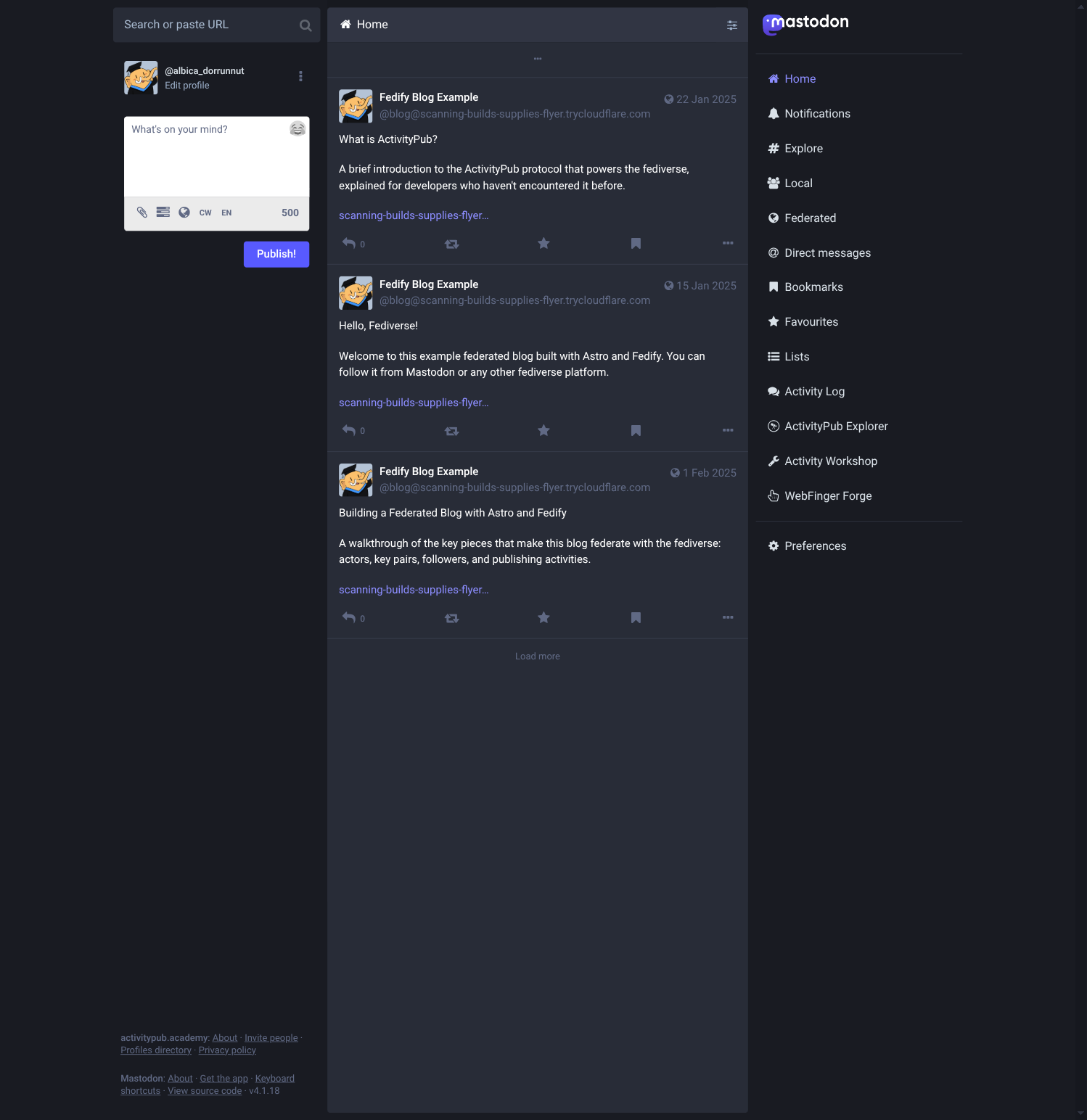
Find the post you want to reply to and click the reply icon below it to open the compose box:
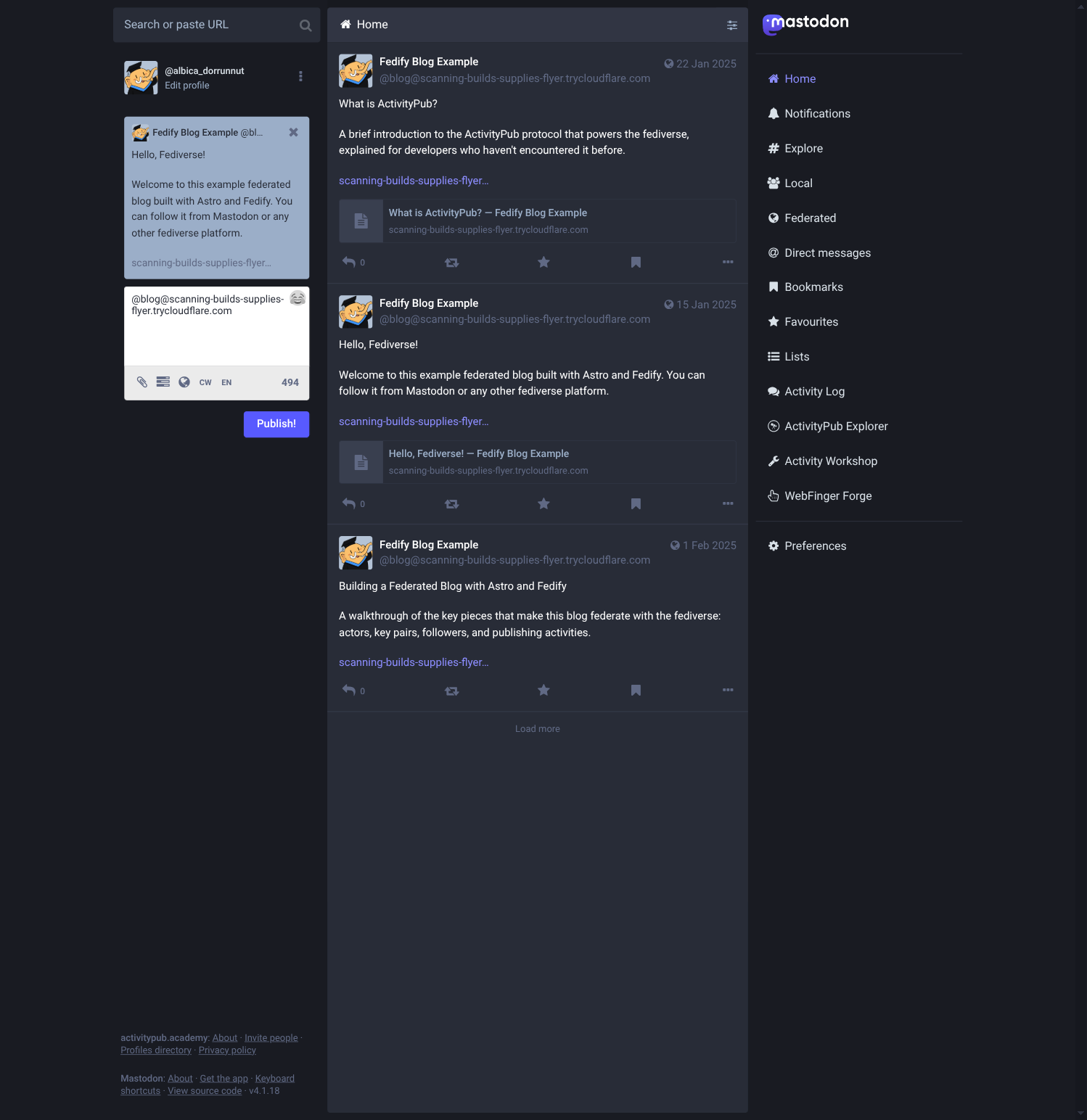
Type a comment and click Reply to send it:
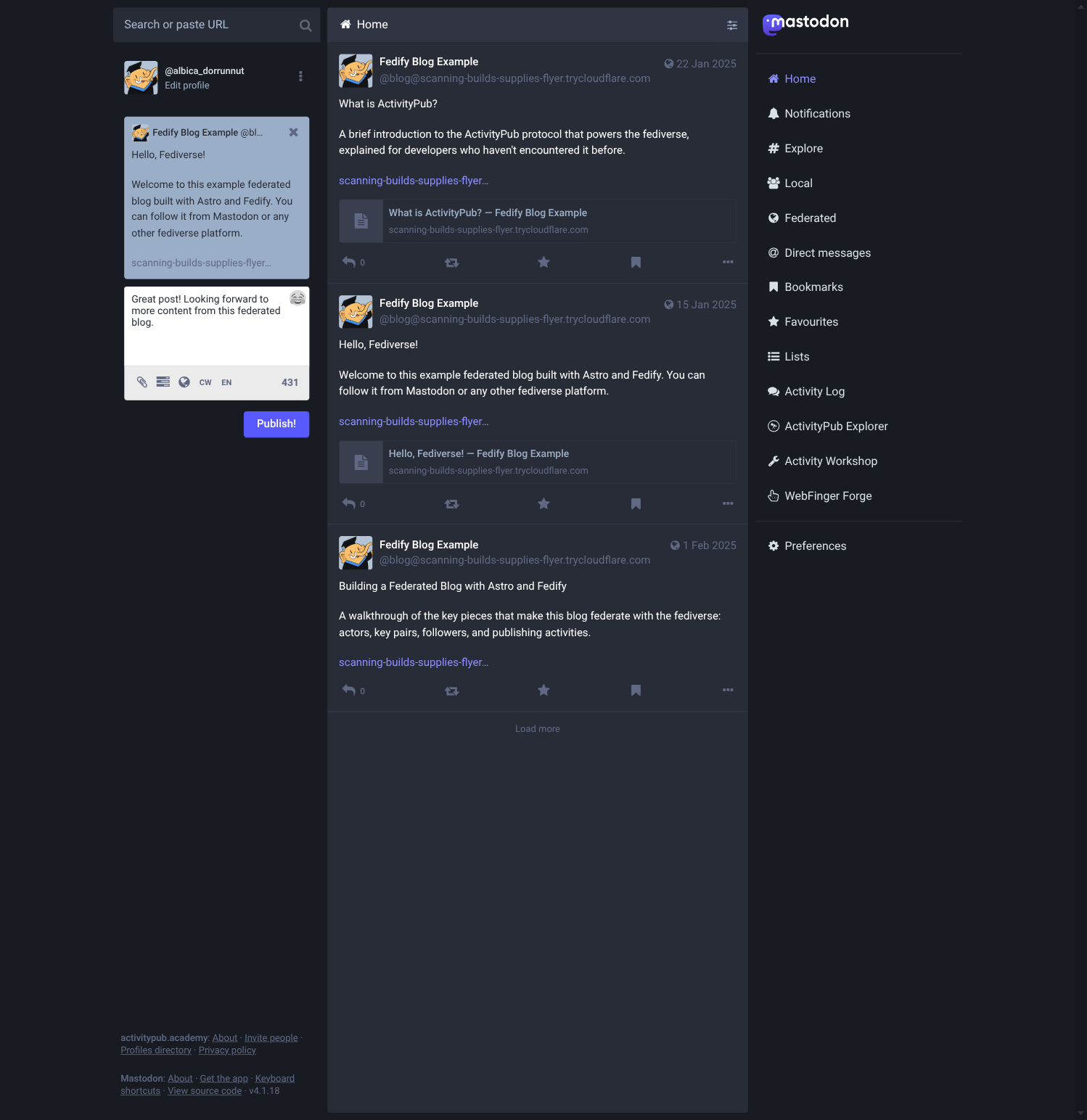
ActivityPub.Academy delivers a Create(Note) activity to your blog's inbox. Within a second or two you should see:
INF astro-blog New comment on /hello-fediverse by https://...Now open http://localhost:4321/posts/hello-fediverse in your browser. The comment from ActivityPub.Academy appears in the “Comments” section below the post:
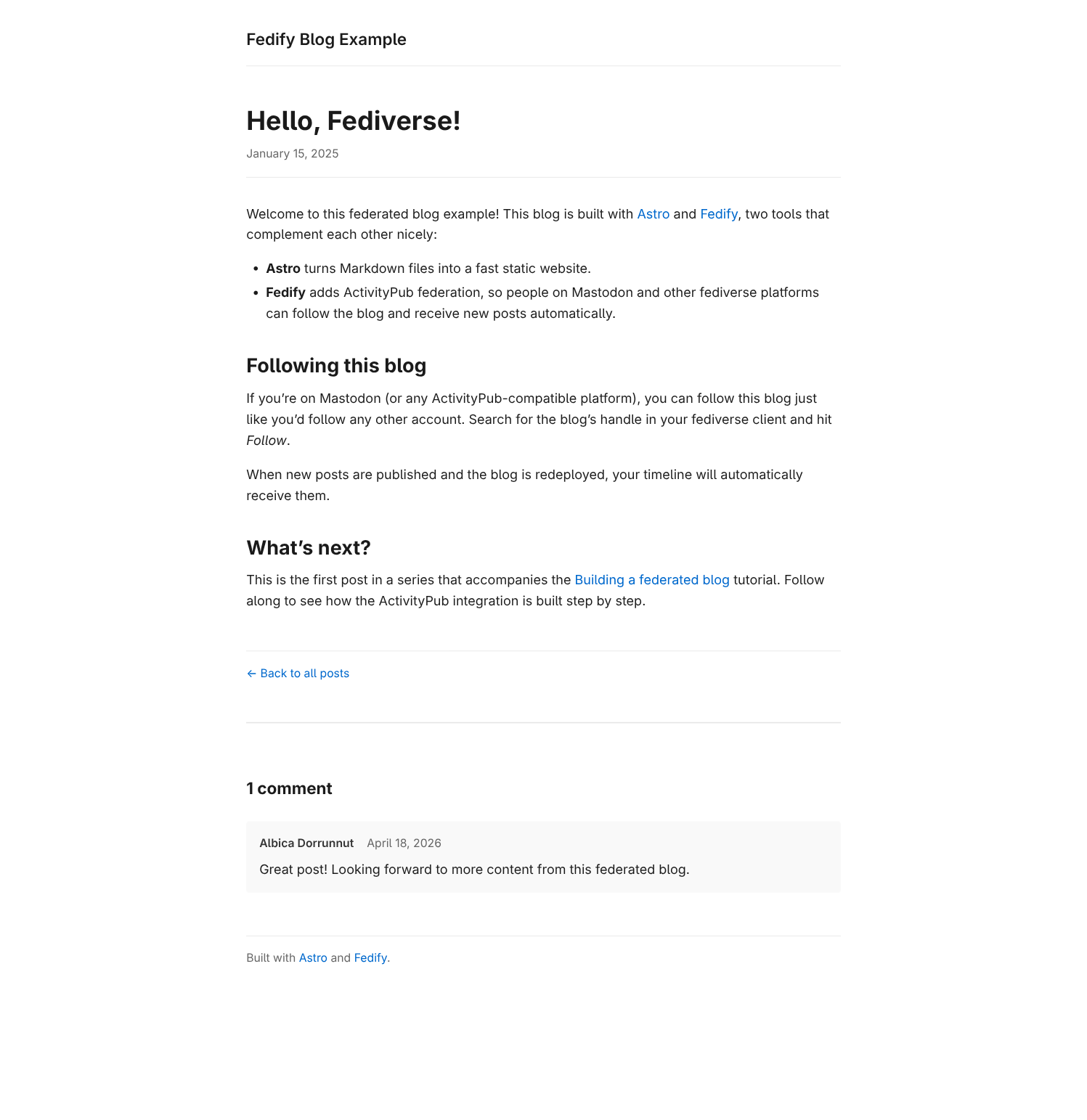
To test deletion: delete the reply on ActivityPub.Academy and reload the post page. The comment should disappear.
What's next
You've built a fully federated blog: static Markdown posts backed by Astro, ActivityPub federation backed by Fedify, and a SQLite database that makes everything survive restarts. Here are some directions to take the project further.
Security: sanitizing comment HTML
The most important production concern is HTML sanitization. Fediverse servers send Note.content as HTML, and rendering it verbatim with set:html exposes your readers to XSS. Before shipping:
Install a sanitization library such as sanitize-html or DOMPurify (the latter runs in a Web Worker or via jsdom on the server).
Before calling
addCommentorupdateComment, strip the HTML down to a safe subset:typescriptimport sanitizeHtml from "sanitize-html"; const safeContent = sanitizeHtml(object.content?.toString() ?? "", { allowedTags: ["p", "br", "a", "strong", "em", "code", "pre"], allowedAttributes: { a: ["href", "rel"] }, });Consider stripping the
hrefattribute on links too unless you validate the URL scheme (to preventjavascript:links).
Notifying followers when the actor profile changes
If you change BLOG_NAME or BLOG_SUMMARY, remote servers will still show the old profile until they re-fetch the actor. Send an Update(Person) activity on startup whenever the actor metadata changes:
await ctx.sendActivity(
  { identifier: BLOG_IDENTIFIER },
  "followers",
  new Update({
    id: new URL(`#update-actor-${Date.now()}`, ctx.getActorUri(BLOG_IDENTIFIER)),
    actor: ctx.getActorUri(BLOG_IDENTIFIER),
    object: await ctx.getActor(BLOG_IDENTIFIER),
  }),
);
Sending Delete(Article) when a post file is removed
Our current syncPosts implementation sends Delete(Article) when a post slug disappears from the collection, but only if the server has been running long enough to have stored the post in SQLite. If you've never deployed a version that ran syncPosts, the posts table may be empty and the deletion won't be noticed. One fix is to seed the posts table from a deployment manifest.
Image attachments
To include images in posts, set the attachments property on the Article object to a list of Document or Image objects with the image URL, media type, and optional alt text:
import { Document } from "@fedify/vocab";

new Article({
  // ...
  attachments: [
    new Document({
      mediaType: "image/jpeg",
      url: new URL("/images/my-photo.jpg", ctx.url),
      name: "My photo alt text",
    }),
  ],
});
Deploying to Fly.io
Fly.io is a platform that runs your app in Docker containers close to your users. If you choose to deploy there, the main thing to handle is SQLite persistence: containers are ephemeral, so blog.db would be wiped on every deploy unless you store it on a durable volume.
Fly Volumes are persistent disks you attach to a Fly machine—similar to a network-attached block device. To use one, mount it in fly.toml and point the database at the mounted path via an environment variable:
const db = new Database(process.env.DB_PATH ?? "blog.db");Make sure your Dockerfile runs bun run build and starts the server with bun dist/server/entry.mjs (Astro's @astrojs/node standalone output).
For general guidance on running Fedify applications in production—key–value store choices, message queue setup, and runtime-specific tips—see the Deployment manual. For a full reference on the @fedify/astro package options used throughout this tutorial, see Astro in the Framework integrations manual.
Congratulations
You've covered a lot of ground: WebFinger, HTTP Signatures, Object Integrity Proofs, actor/inbox/followers dispatchers, Create/Update/Delete activities, content negotiation, and SQLite persistence. These are the building blocks of everything federated on the web today.
The full source code for this tutorial is available in the astro-blog repository.